1:38

The Pika x ChatGPT Plugin Extension is here
Pika · AI · Oct 2026
Amazon · Aug 2024 · 0:59 · Clip · AI-annotated
studio Yum Yum Videos
Amazon’s 0:59 clip runs 24 scenes, about 2.5 s each. The product is on screen from the first frame and 3 features are revealed. The call to action lands at 0:49 (84% in), over a voiceover. The video is a locked split screen that plays the finished 2D and 3D animation on the left against its grayscale storyboard on the right, advancing one beat at a time in step with the voiceover. Its signature moves are the spinning gold coin, the purple checkmark confirmation and the brush-script logo that draws itself on at the end.
Is this your launch? to your site or press kit.
Pika · AI · Oct 2026
Ramp · Finance · Sep 2026
Split-screen comparison of a 3D animation and its storyboard. Left: a purple-outlined phone holds a spinning yellow coin, then tilts as the coin flies off with a motion trail. Right: a flat black-and-white sketch mirrors the same beat with a curved arrow.
On-screen text: “1.1”, “Animation”, “Storyboard”, “Yum Yum Stories”, “1.2”
Techniques: Split screen, 3D mockup
Camera: Static
A locked-off split screen compares a colored 2D animation of a man tossing a yellow ball on the left with a black-and-white storyboard sketch of the same pose on the right. Captions read Animation and Storyboard below the panels, with a 2.1 slate above.
On-screen text: “2.1”, “Animation”, “Storyboard”
Techniques: Split screen
Camera: Static
A split screen shows a 3D animation of floating app icons and coins over a pastel gradient on the left, paired with a black-and-white storyboard on the right where a coin flips onto an hourglass icon.
On-screen text: “Animation”, “Storyboard”
Techniques: Split screen, 3D mockup
Camera: Static
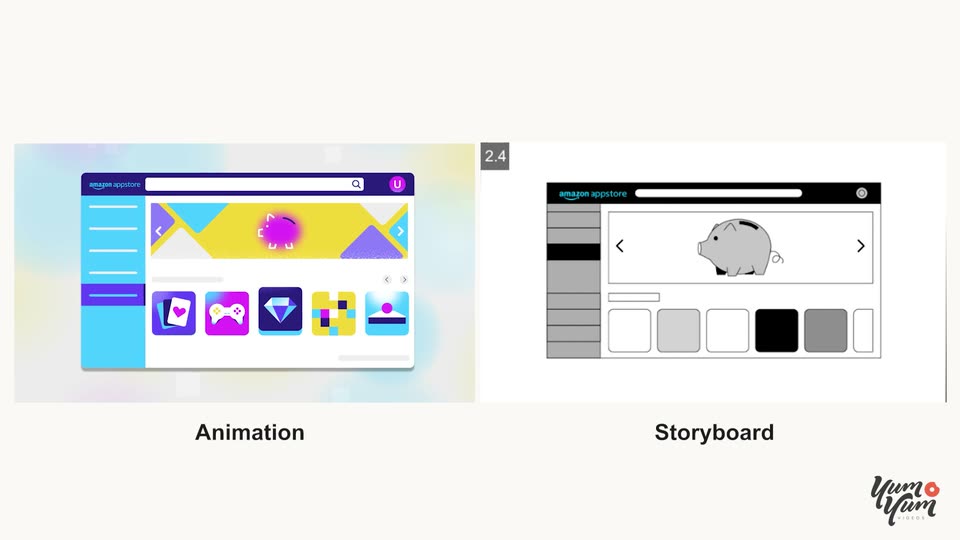
Side-by-side panels compare the animation with its storyboard. Left: an Amazon appstore mockup tilts in 3D, zooming from a yellow banner where a purple round character sits in white corner brackets out to the full window with app icons. Right: a static piggy-bank wireframe.
On-screen text: “2.4”, “Animation”, “Storyboard”
Techniques: Split screen, UI zoom, 3D mockup
Camera: Static
Split screen compares a colored 2D animation of a man with a laptop and drifting app cards on the left to a static line-art storyboard of the same man pointing at a card on the right, each captioned below.
On-screen text: “3.1”, “Animation”, “Storyboard”
Techniques: Split screen
Camera: Static
Split screen shows a flat color animation of people using devices in a living room next to its black-and-white storyboard; the storyboard number changes from 3.2 to 4.2 as amazon download callouts appear, then the animation zooms onto the man on the sofa.
On-screen text: “Animation”, “Storyboard”, “3.2”, “4.1”, “4.2”
Techniques: Split screen
Camera: Static
A split layout pairs a 3D phone mockup on the left, rotating from its purple Amazon Coins screen to its dark blue back, with a static flat storyboard of the same interface on the right. Colored squares drift behind the phone.
On-screen text: “4.3”, “Animation”, “Storyboard”
Techniques: Split screen, 3D mockup
Camera: Static
A split screen pairs an animated 3D laptop on the left, rotating from a tilted angle to face forward, showing an Amazon storefront with a coin and price buttons, beside a flat black-and-white wireframe storyboard on the right tagged 5.1.
On-screen text: “Animation”, “Storyboard”, “5.1”
Techniques: Split screen, 3D mockup
Camera: Static
Split-screen compares the finished animation with its storyboard. Left: two tilted phones in perspective, gold coins fly from the left phone's card across colored dots to the right phone, where a blue banknote marked 1 appears. Right: flat sketches of the same phones, labeled 5.1 then 5.2.
On-screen text: “Animation”, “Storyboard”, “5.1”, “5.2”, “Yum Yum foods”
Techniques: Split screen, 3D mockup
Camera: Static
A split-screen slide compares a 3D animation of two phones swapping coins and a banknote on the left with a flat storyboard sketch of the same shot on the right. Static labels caption each panel, and a small number tags the storyboard.
On-screen text: “5.2”, “Animation”, “Storyboard”
Techniques: Split screen, 3D mockup
Camera: Static
A split layout compares two panels: the left plays the finished animation of a phone, a purple money bag and rising gold coins, the right shows the matching black line-art storyboard with cyan plus marks. Black captions label each panel, a studio logo sits bottom right.
On-screen text: “5.2”, “Animation”, “Storyboard”, “5.3”
Techniques: Split screen
Camera: Static
A split-screen compares two panels. Left, labeled Animation, shows a 2D phone with purple money bags and a gold coin, then a phone with a yellow card and a glowing piggy bank. Right, labeled Storyboard, shows the same in grayscale line art, ending as a tiled grid.
On-screen text: “Animation”, “Storyboard”
Techniques: Split screen
Camera: Static
A split screen compares a colorful animation on the left with a black-and-white storyboard on the right, both showing a grid of device frames over orange circles. The labels Animation and Storyboard sit centered beneath each panel, with a brush-script logo in the corner.
On-screen text: “6.1”, “Animation”, “Storyboard”
Techniques: Split screen
Camera: Static
A split screen compares the final animation on the left with its storyboard on the right. The left app mockup switches from a dashboard with app icons to a color-match game grid while a coin flips in, and the right shows the matching wireframe frames with a magnifying glass.
On-screen text: “Animation”, “Storyboard”
Techniques: Split screen
Camera: Static
A split screen pairs the finished flat UI animation on the left with grayscale storyboard wireframes on the right. The left card shows a heart icon between star and lightning tiles, then a coin counter, while the right sketches mirror each beat. Labels sit below each half.
On-screen text: “Animation”, “Storyboard”
Techniques: Split screen, UI zoom
Camera: Static
Split screen compares a colorful coin-purchase UI on the left with a grayscale storyboard on the right. A hand cursor taps a coin, drags a slider, and confirms, while the storyboard mirrors each beat and a step number ticks from 7.2 to 7.4.
On-screen text: “7.2”, “Animation”, “Storyboard”, “7.3”, “7.4”
Techniques: Split screen, Cursor demo
Camera: Static
Split screen compares the finished animation with its storyboard. Left, a white modal card with a yellow coin and purple check shrinks and settles into a phone screen; right, a matching line sketch morphs from a square card into a phone outline. Captions label each panel.
On-screen text: “Animation”, “Storyboard”, “8.1”
Techniques: Split screen, Morph
Camera: Static
Side-by-side comparison: the left animated app screen cuts from a yellow coin with a purple checkmark to a blue world map behind a white phone listing checkmarks; the right storyboard sketch cuts from a phone to a globe with checkmark pins. Captions label the panels Animation and Storyboard.
On-screen text: “Animation”, “Storyboard”, “8.1”, “8.2”
Techniques: Split screen
Camera: Static
A split-screen comparison: on the left a blue world map with red pins scrolls horizontally under the label Animation, on the right a grayscale globe sketch with checkmark circles sits under the label Storyboard.
On-screen text: “Animation”, “Storyboard”
Techniques: Split screen
Camera: Static
A split-screen compares the finished animation with its storyboard. Left: a blue infinity loop with yellow coins and colored arcs; right: a gray loop with coin markers. The view pulls back from a tight crop to reveal both full shapes.
On-screen text: “Animation”, “Storyboard”, “8.3”, “8.4”
Techniques: Split screen
Camera: Static
A split screen pairs a flat color animation on the left with its black-and-white storyboard on the right. A man seen from behind holds a tablet; his thumb taps a yellow coin inside a browser window and a purple checkmark pops in.
On-screen text: “Animation”, “Storyboard”, “8.5”
Techniques: Split screen
Camera: Static
Split screen compares a color animation of a man on a purple couch using a tablet, with heart, star and pencil icons floating up, to a black-and-white storyboard of the same pose. Labels under each panel read Animation and Storyboard.
On-screen text: “Animation”, “Storyboard”, “8.6”, “Yum Yum TOONS”
Techniques: Split screen
Camera: Static
A split screen compares the flat 2D animation (left) with its black-and-white storyboard (right): a glowing game chest, a hand tapping BUY, the chest shrinking into a payment card with a rainbow border, then a hand offering a $9 bill, mirrored by a tapping finger on the right.
On-screen text: “Animation”, “Storyboard”, “9.3”, “9.4”
Techniques: Split screen, Morph
Camera: Static
On a cream background, a charcoal brush stroke draws itself into the script word Yum, a second Yum follows beneath, then an orange sprinkle donut pops in at the upper right and the spaced label VIDEOS settles below, completing the stacked logo.
On-screen text: “Yum Yum VIDEOS”
Techniques: Kinetic type
Camera: Static