0:52
Explore
00:00:00 / 01:18:24
- Length
- 1:18
- Scenes
- 31 · 2.5 s avg
- Product on screen
- 0:05
- Features shown
- 1
- Call to action
- 0:57 · 73%
- Voiceover
- Yes
- Views
- 15M on X
as of November 18, 2026
AI Key’s 1:18 launch film runs 31 scenes, about 2.5 s each. The product shows up at 0:05 and 1 feature is revealed. The call to action lands at 0:57 (73% in), over a voiceover. The video opens with a warm live-action host, cuts to a sleek 3D product reveal on a black, purple-lit void, then alternates animated task-completion demos with live phone demos, a color reveal, a price-and-link CTA, a comedic bridge gag, and a logo outro. Its signature moves are floating 3D objects with purple rim light, blur-in and slide-in text, a glowing hand cursor tapping notifications, and rapid pill word-swaps cut to a steady 130 bpm pulse.
Footage neededEstimated needs: 1 capture group — your screens or recordings · 1 official logo — reused across the film · 11 filmed passages — shoot, supply or replace · 1 graphic passage — draw or supply · 12 3D passages — build or supply
Is this your launch? to your site or press kit.
More like this
0:58

3D YC Startup Launch Video | Neuron Industries $10M Billboard Announcement
Neuron Industries · Oct 2026
1:40


Best AI SaaS Product Launch Video | Sovera
Sovera · May 2026
Similar soundtrack
Films whose music sounds like this one, voice left out
0:59

Introducing Telamont - Construction Risk Operations Platform
Telamont · Lo-fi hip-hop, chillwave
1:00

Meet Miro Lite, the free online visual workspace for teams
Miro · Electronic, Lo-fi Hip-hop, Future Bass
0:48

Probo - SOC 2 in a week
Probo · Lo-fi hip-hop and electronic dance music
Adam - Introducing AI Key, a small device that lets AI control your entire p, scene by scene
· 31 scenes as text
01 · Hook · 0:00–0:05
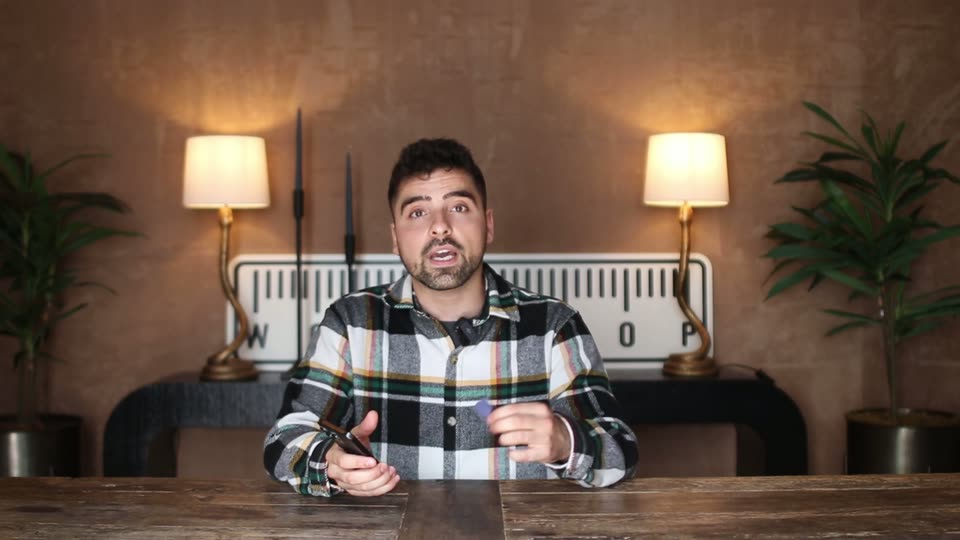
A man in a plaid shirt sits centered at a wooden table, talking to camera in a warm-lit room with two lamps and a lettered wall panel behind him. The camera slowly pulls back as he gestures and finally holds up a small blue object between his fingers.
Camera: Pull out
02 · Product intro · 0:05–0:06
A dark abstract 3D form with thin purple rim lighting fills the frame, a purple crescent shape floating near the top. The word Introducing sits centered in white over the black void, the camera locked off.
On-screen text: “W”, “Introducing”
Camera: Static
03 · Product intro · 0:06–0:12
A purple key-shaped USB device floats in 3D on black, sliding left and right as white captions appear on the opposite side. Small app icons pop in around the second caption, then fade out.
On-screen text: “Introducing”, “AI Key”, “by dafdef”, “A small device that lets AI”, “control your phone.”, “... that can complete”, “tasks across all your apps.”
Techniques: 3D mockup
Camera: Static
04 · Demo · 0:12–0:17
A black smartphone hangs in a dark void, its bottom edge catching light, as a purple USB-C dongle snaps into the port and later detaches. The line 'Plug it when you need AI' fades in on the right, then 'Unplug when you don't' on the left.
On-screen text: “Plug it when you need AI”, “Unplug when you don't”
Techniques: 3D mockup
Camera: Static
05 · Demo · 0:17–0:18
A smartphone with a blue wavy lock screen rises from the bottom edge into the center of a black stage with a purple floor. The device sits in 3D perspective with a soft floor reflection, and the on-screen time scales up as it settles. A static tagline reads Unplug when you don't.
On-screen text: “Unplug when you don't”
Techniques: 3D mockup
Camera: Static
06 · Demo · 0:18–0:19
A front-on iPhone mockup hovers over a purple floor in a dark void. Its lock screen stack of notifications scrolls up, then a glowing hand pointer and a Dafdef AI badge pop in at the bottom left.
On-screen text: “Dafdef AI”
Techniques: 3D mockup
Camera: Static
07 · Demo · 0:19–0:20
A 3D phone mockup shows a lock screen with the time 9:41. A purple hand cursor taps the screen and notification cards burst out, scattering in 3D space around the device as it tilts.
On-screen text: “Darder AI”
Techniques: 3D mockup
Camera: Static
08 · Demo · 0:20–0:21
A field of notification cards floats in a dark 3D space with a purple glow at the bottom. A glowing purple hand cursor tagged Dadef AI hovers on the left while the left cards fade out and the right cards drift.
On-screen text: “Dadef AI”
Techniques: 3D mockup, Parallax
Camera: Static
09 · Demo · 0:21–0:22
A purple hand cursor glides right and taps a Dafdef AI badge as the white words “from chaos” slide left and blur out, set against tilted notification cards floating in 3D space on a dark purple field.
On-screen text: “from chaos”
Techniques: 3D mockup, Kinetic type, Cursor demo
Camera: Static
10 · Demo · 0:22–0:23
A white word to sharpens in from blur at center while three tilted notification cards float in 3D on the right, a glowing purple hand cursor hovers over the top card with a Datted AI badge.
On-screen text: “to”
Techniques: Kinetic type, 3D mockup
Camera: Static
11 · Demo · 0:23–0:23
The wordmark clarity reveals on a black background with a faint purple glow along the bottom edge. Letters slide in from left to right with motion blur, the final y in purple, settling into a centered lockup.
On-screen text: “clarity”
Techniques: Kinetic type
Camera: Static
12 · Demo · 0:23–0:27
A glossy purple pill with white side arrows sits centered on black, its lowercase word swapping through a rapid sequence while the pill resizes to fit each term.
On-screen text: “clarity”, “navigate”, “decide”, “execute”, “reply”, “complete”
Techniques: Kinetic type
Camera: Static
13 · Demo · 0:27–0:28
A white rounded task card with an empty checkbox and a sentence of body text floats on a black field with a soft purple glow. A purple gradient sweeps across the card, the checkbox ticks, and a faint green complete label behind it fades out.
Techniques: Light sweep
Camera: Static
14 · Demo · 0:28–0:29
On black, a purple gradient bubble with a checkmark icon shows a task line about AC quotes, then shrinks and rises as a white bubble with a checkmark icon slides up from the bottom into full view.
Camera: Static
15 · Demo · 0:29–0:31
On a dark purple background, a white card with a logo and a task sentence slides up, revealing stacked purple cards with other task sentences. The stack scrolls, then a purple card reading Dafdef AI slides in from the right.
On-screen text: “Opening the email, checking-in for the upcoming medical appointment and adding it to the calendar.”, “Rescheduling a missed package delivery with UPS based on your availability.”, “Getting quotes for installing an AC and schedule the visit based on the reviews and availability.”, “Dafdef AI”
Techniques: Kinetic type
Camera: Static
16 · Demo · 0:31–0:31
On a black field with a purple glow along the bottom, the serif title 'Dafdef AI' slides left and out of frame while the sans-serif line 'clears clutter for you' holds in place.
On-screen text: “Dafdef AI”, “clears clutter for you”
Techniques: Kinetic type
Camera: Static
17 · Demo · 0:31–0:33
A dark background with a soft purple glow along the bottom holds the centered white line “clears clutter for you”. The word “clutter” carries a blue-to-teal gradient that resolves from a soft blur into a clean fill.
On-screen text: “clears clutter for you”
Camera: Static
18 · Demo · 0:33–0:35
Tilted phone screens orbit a black center where white text reads “your tasks...”, then the word scales into a large pink “done”. The center opens to a man at a desk with a laptop, the screens still framing the edges as he looks up at them.
On-screen text: “your tasks...”, “done”
Techniques: Kinetic type, 3D mockup
Camera: Pan
19 · Demo · 0:35–0:39
A man in a plaid shirt sits at a wooden table, holding a smartphone and a small purple USB-C adapter, gesturing as he talks. A transparent glass panel with text wipes across the frame at the start.
Camera: Static
20 · Demo · 0:39–0:45
A pair of hands holds an iPhone over a wooden table, a USB-C cable plugged into the base. The WhatsApp chat fills the screen as a green outline frames it, then a message types itself into the field and sends.
Camera: Static
21 · Demo · 0:45–0:46
A man in a plaid shirt sits at a wooden table, holding a small dark device in one hand while gesturing with the other. He speaks to camera in a warm set with two lit lamps, potted plants, and a ruler-style wall sign. The frame stays locked off.
On-screen text: “Video 18:29”
Camera: Static
22 · Demo · 0:46–0:47
Two hands hold a phone upright over a wooden table in a static close-up. The screen switches from a recents call log to a dark chats view showing a favorites card and bottom tab bar.
Camera: Static
23 · Demo · 0:47–0:48
Two hands hold a smartphone in landscape over a wooden table, the blurred cafe behind. The screen runs a video call where a man's face jumps from a wide-eyed filter to a normal smile.
On-screen text: “chats”
Camera: Static
24 · Feature reveal · 0:48–0:53
A man in a plaid shirt sits at a wooden table, facing the camera and gesturing with both hands as he speaks. The warm room behind him holds two glowing lamps, potted plants and a white sign with vertical lines. The frame stays locked off throughout.
Camera: Static
25 · Feature reveal · 0:53–0:53
A man in a plaid shirt sits at a wooden table, gesturing to camera. The shot dims and a purple and gold 3D stapler with small dots floats in on the right side of the frame.
Techniques: 3D mockup, Particles
Camera: Static
26 · Feature reveal · 0:53–0:54
Three glossy key-shaped 3D objects in black, purple and white tumble and orbit on a black void. The white line 'Pick your color' appears at center as the objects settle into a loose triangle around it.
On-screen text: “Pick your color”
Techniques: 3D mockup
Camera: Static
27 · Feature reveal · 0:54–0:57
Three key-shaped USB connectors in white, black, and purple float on a black stage above the caption “Pick your color.” The caption fades as the keys swing from a scattered arc into a side-by-side row, rotating to face the camera in 3D perspective.
On-screen text: “Pick your color”
Techniques: 3D mockup
Camera: Static
28 · CTA · 0:57–1:04
A man in a plaid shirt sits at a wooden table holding a small black key device and a purple cap. He talks, gestures, and points to the right as a price panel and URL appear beside him. Warm lamps and plants fill the background.
On-screen text: “Limited Pre order”, “$79”, “dafdef.com/aikey”
Camera: Static
29 · Other · 1:04–1:14
Two men stand on the Golden Gate Bridge walkway in bright daylight. The man on the left in a maroon t-shirt leans on the red railing, while the man on the right in a plaid shirt speaks and gestures. Cars and a cyclist pass on the roadway behind them.
Camera: Static
30 · Other · 1:14–1:15
Two men stand on the Golden Gate Bridge walkway. The man in a maroon shirt holds a phone and tugs the arm of a man in a plaid shirt, who leans on the red railing gazing out at the bay. A cyclist in a yellow vest rides past behind them under the bridge towers.
Camera: Static
31 · Outro · 1:15–1:18
A purple compass star forms at center from a blurred, stretched shape, settling into a clean mark with a broken ring around it. A white URL then fades in beneath the logo on a black background.
On-screen text: “dafdef.com/aikey”
Techniques: Morph
Camera: Static