0:39
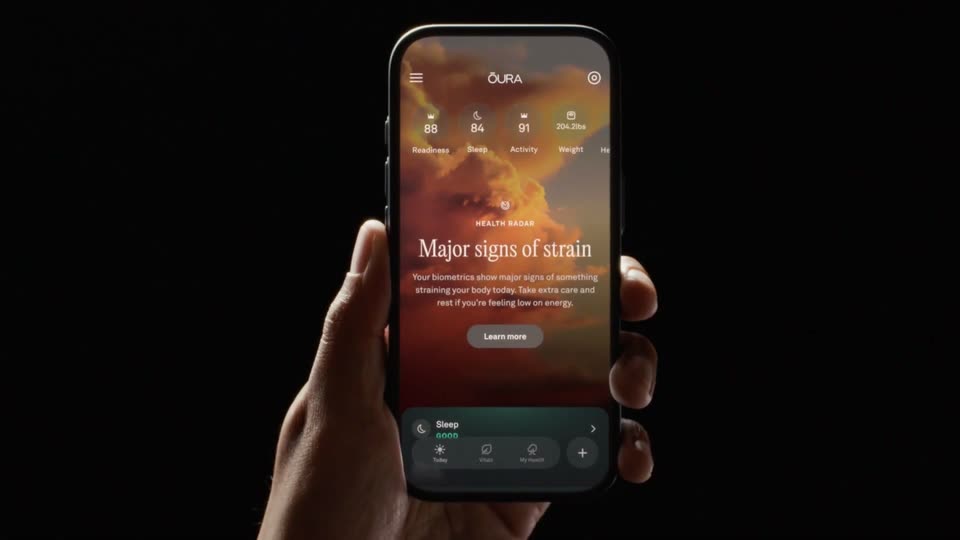

Introducing Health Radar
Oura · Hardware · Sep 2026
Adobe · Apr 2025 · 0:40 · AI-annotated
The video is a rapid montage of interface demos and full-bleed generated renders cut on the beat of a rap track, alternating typed prompts with the results they produce. Signature moves include the large outline cursor, the blue Generate button pop, hard cuts from dark UI to vivid renders, and the recurring magenta glow on black.
Oura · Hardware · Sep 2026
Google · AI · May 2026
Loom · Productivity · Aug 2023
The Adobe Firefly wordmark holds center on a near-black field with a magenta glow in the lower left corner. It scales up and drifts right as a dark UI card showing three 3D robot models fades in behind it.
Camera: Pan
A horizontal row of dark feature cards scrolls left, revealing a parrot, a blue furry creature, and a robot device. A white outline cursor sits at the bottom center, and a pink gradient glow lines the lower edge.
Techniques: Cursor demo
Camera: Pull out
A grid of colorful generated images sits behind a dark rounded prompt bar. The prompt types out word by word, a blue Generate button pops in, and the cursor clicks it as the frame zooms onto the button.
On-screen text: “whale coming out of electric neon ocean sunset breaching water with splashes”
Techniques: Kinetic type, Cursor demo, UI zoom
Camera: Push in
A semi-transparent prompt bar and Generate button sit over a breaching humpback whale against an orange sunset. The interface then fades away to reveal the full generated image.
Camera: Push in
A silver flying craft hovers low over a flower field, futuristic skyline behind, then a hard cut to a black boot splashing into a night puddle.
Techniques: 3D mockup
Camera: Static
A green tree frog with red legs crouches on a lily pad, then lunges forward in a quick jump, dark water and soft bokeh blurred behind it.
Camera: Static
A dark panel with Frame and Prompt columns overlays a blurred grid of images. A white cursor hovers over a small thumbnail of iridescent bubble letters, which scales up to fill the frame slot beside the prompt line.
Techniques: Cursor demo, UI zoom
Camera: Static
A dark prompt panel with two frame thumbnails and a cursor hovers over a blurred image grid, then pulls back to reveal the full interface: a left settings sidebar, a Generate button, and large glossy iridescent letters reading GENERATE GREATNESS.
Techniques: Cursor demo, UI zoom
Camera: Static
Iridescent chrome letter fragments tumble and drift apart on a black preview window inside the app's dark interface, which also shows a settings panel with sunflower motion thumbnails and a prompt bar with a blue Generate button.
Camera: Static
On a black background with a magenta glow, a rounded input bar holds a typed prompt that scrolls left word by word. A blue Generate button slides in at the right edge, a cursor hovers over it, then the whole bar fades to black.
Techniques: Cursor demo
Camera: Static
A neon-lit 3D render of a fox in a fedora and trench coat fills a rounded frame. A dark Resolutions panel on the left highlights 540p, then a white cursor slides down and the highlight jumps to 720p.
Techniques: Cursor demo
Camera: Push in
A 3D noir fox in a leather coat stands in a neon cyberpunk alley while a dark settings panel on the left switches from a Resolutions list to an Aspect Ratio list, the active row glowing purple and a cursor hovering over the options.
Techniques: Cursor demo
Camera: Pull out
A rounded card floats on a black field with a magenta glow at lower left. Inside, a 3D-styled illustration shows a fox in a fedora and trench coat standing in a neon alley; the image slowly reframes while a small Generate label scales in.
On-screen text: “Generate”
Camera: Static
A masonry grid of colorful AI artwork fills the frame and drifts slowly. A dark rounded prompt bar spans the center; a prompt types in letter by letter, then a white cursor moves in and clicks the blue Generate button.
Techniques: Kinetic type, Cursor demo
Camera: Push in
A painterly portrait of a woman wearing a crown of pink, blue and white flowers with butterflies fills the frame over a sunset landscape. A dark vignette lifts to reveal the image, and a Generate button slides in along the bottom edge.
Techniques: Masking
Camera: Push in
A dark gothic tower with a glowing spire rises from green foliage, framed by pale arched openings. Small orange embers drift through the misty air around the structure.
Techniques: Particles
Camera: Static
A static macro close-up of a coiled pink snake with glossy porcelain-like scales, its head resting on its body among embroidered pink blossoms and green leaves, set against a blurred dark green background.
Camera: Static
An ornate silver picture frame stands upright in calm blue water, its red-sky mountain image mirrored in the ripples below. The background shifts from clear blue to a warm sunset gradient over the short clip.
Techniques: 3D mockup
Camera: Static
A woman with long red hair stands in profile, her hair blowing in the wind against a warm sunset sky. The camera holds a medium close-up while strands move across the frame.
Camera: Static
A 3D moodboard interface shows a colorful flower image and a room render, labeled Firefly Boards. The view zooms into one tile, an orange album cover, as a vinyl record slides out and small image tiles scatter around it on a dark gradient.
On-screen text: “Firefly Boards”, “Quickly visualize ideas with new Firefly Boards (beta), the generative AI-first approach to moodboarding.”
Techniques: 3D mockup, UI zoom
Camera: Push in
A 3D vinyl record with a blank white cover emerges from a peach square on a dark background, ringed by small abstract thumbnails. The shot blurs as icon toolbars and a prompt field slide in at the edges.
Techniques: 3D mockup
Camera: Static
A dark prompt panel sits over a blurred canvas. A cursor types a flower prompt into the field, clicks Generate, and a row of generated flower thumbnails pops up. Hovering shows a Place on canvas tooltip, then the view reframes to the canvas with the flowers placed on a white card.
Techniques: Cursor demo, UI zoom
Camera: Push in
On a dark canvas, a cursor boxes three flower thumbnails, clicks a Remix button, and three new flower variations appear beside them. The vinyl record image then clears to white while a balloon-flower scene drops into the center.
Techniques: Cursor demo
Camera: Push in
A 3D album cover with a balloon flower and a vinyl record sit on an orange gradient, framed by a thumbnail strip and two cursor arrows that vanish as the view zooms in to center the artwork.
Techniques: UI zoom, 3D mockup
Camera: Push in
A red square with a white A knocked out sits centered on a white field. The red fill contracts inward until only the solid red A mark remains, holding still.
Techniques: Morph
Camera: Static