2:02
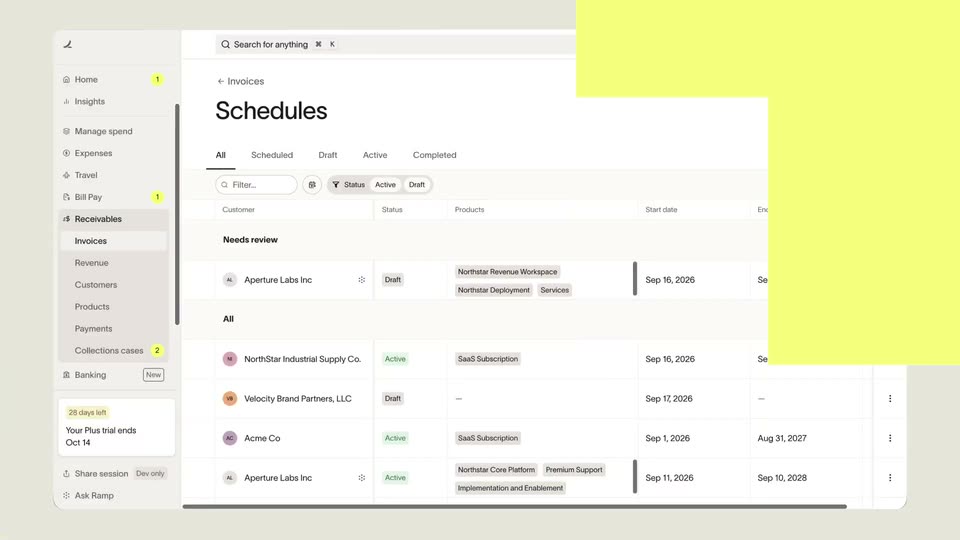

Introducing Ramp Accounts Receivable
Ramp · Finance · Sep 2026
Tana · Jun 2026 · 3:01 · AI-annotated
A host-led product demo that drops straight into a dark Tana meeting UI and keeps cutting between the interface and a full-screen talking head, with the presenter narrating each capability as the cursor drives the on-screen actions. The structure is a single continuous walkthrough: a live meeting, acting on its content, post-meeting connections, building agents, then a quick integrations montage, closing on a URL and a tilting glass cube logo.
Ramp · Finance · Sep 2026
Resend · Developer tools · Apr 2026
Notion · Productivity · Nov 2022
A dark video call window on the left shows a bearded man in a navy t-shirt talking and gesturing, while a LiveDigest panel on the right stays empty until a single bullet point types in at the end. A cursor drifts from the video down to the bottom toolbar.
Camera: Static
A dark video-meeting window shows a man's live feed left, a blurred Tana tile center, and a LiveDigest panel right. The status line toggles between Following Along and Thinking as a small Voice Running card fades in below the Add Taking Points box.
Camera: Push in
A dark meeting app window is revealed as the view pulls back from a close-up of a campaign card on the right. The full interface shows a video tile of a man on the left, a blurred color panel, a LiveDigest list, and agent cards on the right.
Techniques: UI zoom
Camera: Pull out
A dark video meeting interface sits still, showing a man in a dim room on the left and a LiveDigest sidebar on the right with a pinned campaign card. A cursor rests at the bottom edge.
Camera: Static
A dark meeting app fills the frame with live video tiles and a LiveDigest panel. The cursor clicks the pinned campaign card, which expands into a full document view that scrolls through the brief, strategy and a concept table while the meeting dims behind it.
Techniques: Cursor demo, UI zoom
Camera: Pan
A man in a navy t-shirt sits in a dim room with shelves of framed photos and a hanging bulb behind him. He speaks to the camera, gesturing with both hands, then looks down briefly. Locked-off medium close-up.
Camera: Static
A dark collaboration app interface sharpens from a blur, framing a video tile, a sidebar and a campaign card. A dark command bar at the bottom holds 'github' with a 'Create GitHub Issue' row, where a cursor hovers and clicks.
Techniques: Cursor demo
Camera: Push in
A dark capture menu lists skill tiles over a blurred meeting screen. The cursor hovers the Coding agent prompt tile, flagged by a white caption. The menu then fades out to reveal the full view: two video feeds and a meeting notes panel.
On-screen text: “A self-contained prompt a coding agent can pick up and build”
Techniques: Cursor demo
Camera: Pull out
A dark video-call screen shows two participants in tiles beside a Live Digest panel. A coding-agent prompt menu closes, a new bullet slides into the digest list, and the cursor moves to the red end-call button and clicks it as the participants wave.
Techniques: Cursor demo
Camera: Pull out
A dark blue meeting UI shows a Live Digest panel on the left and floating meeting cards on the right. The right cards and participant video tile brighten from a dimmed overlay into full view while a cursor rests in the digest panel.
Camera: Static
Dark Tana workspace: digest panel left, stacked cards right, presenter video tile top right. The summary card updates to “Nothing generated”, the column reflows to add a meeting-summary document card, and the left sidebar slides in while the cursor hovers the campaign card.
Techniques: Cursor demo
Camera: Static
A dark CRM workspace fills the frame with a small presenter video inset in the top-right corner. The cursor drifts over the client card grid, then the cards shuffle into a new order as Tana and GreenLeaf swap rows, while the presenter keeps talking.
Techniques: Cursor demo
Camera: Static
A dark CRM board with Inbox, Lead and Active columns fills the screen; a video call of a man in a blue shirt sits in the top-right corner. A cursor clicks the Fjord Fitness card, opening a detail panel with industry, website and notes fields.
Techniques: Cursor demo
Camera: Static
A dark CRM screen holds steady on a client card titled Ford Fitness, listing tags, industry, website and notes, with a kanban column behind it. A presenter talks in a small webcam window at the top right; a cursor rests over the column header.
Camera: Static
A dark app window with a left sidebar and a greeting fills the frame, a presenter video inset sits top right. The view zooms into the command bar as a cursor types a long prompt, then zooms back out to the full window.
Techniques: UI zoom, Cursor demo
Camera: Static
The Tana app shows a chat where a user requests a meeting prep agent; the reply streams in with a confirmation badge, then the view jumps to the new agent's detail page. A presenter sits in a webcam box at the top right while the camera zooms into the thread.
Techniques: Cursor demo, UI zoom
Camera: Pull out
A dark Tana interface shows the Sales Call Briefing Agent page with a sidebar of agents and empty Work, Chats, and Voice sections, while a small video of the presenter sits in the top-right corner. The UI darkens and the presenter scales up to fill the frame.
Camera: Static
A man in a navy t-shirt with a small white line logo sits in a dim room with dark walls, shelves of framed art, and a warm hanging lamp. He faces the camera in a locked-off medium close-up and gestures with both hands while speaking.
Camera: Static
A bearded man in a navy tee talks to camera in a dim room with shelves and a warm lamp. A semi-transparent whiteboard interface fades in over him, showing a left sidebar, handwritten notes inside a green star and blue circle, and a video tile of his face.
Camera: Static
A dark canvas interface displays a hand-drawn green star reading “I can't draw” and a blue circle reading “This looks bad”, joined by a dashed arrow. A small video of a presenter sits in the top right corner above a shape picker, while a cursor rests near the center.
Camera: Static
A dark Tana dashboard fills the frame, with a small rounded webcam feed of a presenter in the top right. The mouse cursor glides to the blue send button in the chat field and clicks it, while the greeting, action chips and meeting cards stay still.
Techniques: Cursor demo
Camera: Push in
The Tana home screen fades in on a dark blue field, its command bar holding a typed migration prompt with a cursor at the end. The presenter's webcam view sits in the top-right corner as he speaks, while the action buttons and schedule lists stay still beneath.
Techniques: Cursor demo
Camera: Push in
A dark empty screen holds a white cursor that drifts from the center toward the right edge. A tiny gray cube rests near the bottom, and a webcam inset of the presenter in the top-right corner slowly enlarges.
Techniques: Cursor demo
Camera: Static
A man in a navy t-shirt sits in a dim room with wooden shelves, framed art and a hanging lamp, speaking to the camera. The frame opens soft and pulls into focus as he raises a finger to make a point.
Camera: Pull out
A dark Tana dashboard fills the frame with a sidebar and a cursor resting on the Next Up row. A small video of a man gesturing in a dim room occupies the top-right corner; a blurred dark rectangle sweeps across the lower right at the start.
Camera: Static
A 3D glass logo mark with a white left face and an iridescent blue-green right face fades in on white, then tilts as the gradient shifts across the surface.
Techniques: Light sweep
Camera: Static