2:26
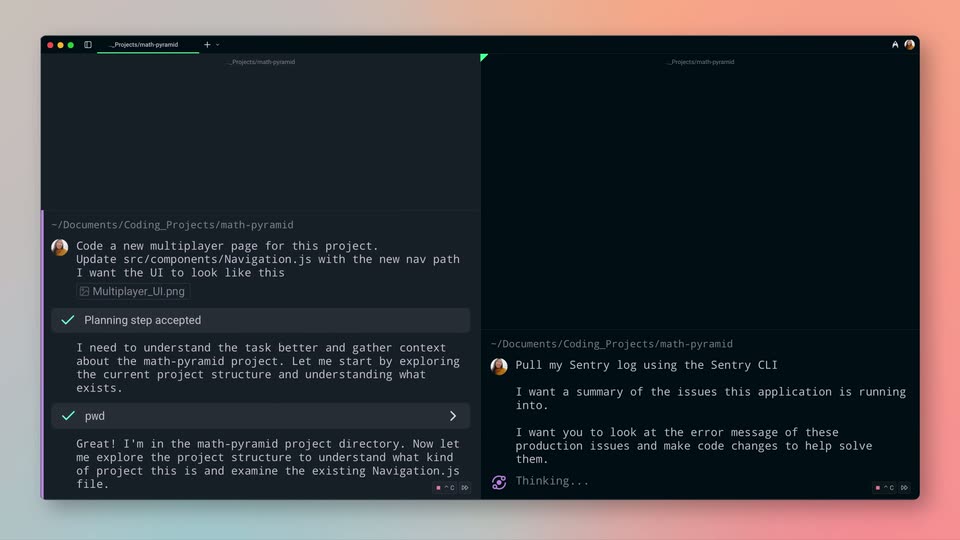

Introducing Warp 2.0: The Agentic Development Environment
Warp · Developer tools · Jun 2025
Microsoft · Mar 2023 · 2:16 · AI-annotated
The film alternates bright studio presenters with 3D glassmorphism UI panels and pastel title cards, walking app by app (Word, PowerPoint, Excel, Outlook, Teams, Business Chat) and using press quotes as punctuation between demos. Its signature moves are text typing out letter by letter in frosted glass fields, panels tilting and flattening into place, and oversized quotation marks on soft gradients, all cut to a brisk 123 bpm rhythm.
Warp · Developer tools · Jun 2025
ElevenLabs · AI · Dec 2024
ClickUp · Productivity · Jun 2022
A soft pastel gradient background fades in from black. A small subhead scales in above a large two-line headline that appears in black, left-aligned.
On-screen text: “Reinventing Productivity”, “The Future of”, “Work with AI”
Techniques: Kinetic type
Camera: Static
A presenter in a navy sweater stands in a bright room, gesturing as he speaks, beside a frosted glass card showing the Microsoft 365 Copilot logo and name; the logo shifts from gray to a blue-purple gradient and the caption darkens while a headline scales in.
On-screen text: “Reinventing Productivity”, “The Future of”, “Work with Al”, “Microsoft 365 Copilot”, “9”
Techniques: Kinetic type
Camera: Static
A tilted 3D perspective of a document editor, toolbar blurred at the top. In the white body, a rounded chip types out Copilot beside a hexagon logo, letter by letter, finishing with a text caret.
Techniques: 3D mockup
Camera: Static
A transparent laptop on a light wood desk types a sentence onto its white screen, the cursor pausing after each word. A blue chair, a star in a glass cube, scissors and product boxes fill the desk, pink dunes glowing through the window behind.
Techniques: 3D mockup
Camera: Push in
A 3D laptop mockup on a wooden desk against a blurred pastel backdrop. On the white screen, a black headline types out letter by letter with a blinking cursor, scrolling left as it fills; the camera slowly pushes in.
On-screen text: “The most powerful productivity tool on the planet?”
Techniques: 3D mockup, Kinetic type
Camera: Push in
On a light gray surface, a white pill-shaped recess holds the dark gray phrase “your own words” in 3D perspective. The phrase scales up in place while the pill turns to a flatter, front-facing angle.
On-screen text: “your own words”
Techniques: Kinetic type, 3D mockup
Camera: Static
A white 3D platform with concentric rounded ridges fills the frame in perspective. The dark gray lowercase phrase 'your own words' lies diagonally across it, its last letters blurred and hanging from thin vertical lines as the line scales and slides.
On-screen text: “your own words”
Techniques: Kinetic type
Camera: Static
A Microsoft Teams window with the Copilot chat panel is shown on a pale blue backdrop, the view pulling back to reveal the full frame. A large faceted blue-and-black 3D crystal on the right shrinks and drifts to the center, settling as a small floating gem over the interface.
Camera: Pull out
Stacked 3D panels of Microsoft 365 apps rotate and flatten into a white card with the Copilot logo and title, then the frame splits to add a presenter gesturing on the left.
On-screen text: “Microsoft 365 Copilot”, “Natural Language”, “Large Language Models”, “Microsoft Graph - Your Data”, “Microsoft 365 Apps”
Techniques: 3D mockup, Morph, Split screen
Camera: Static
A presenter in a navy sweater stands left of frame in a bright room, gesturing then clasping his hands, while a large graphic card on the right shows the Microsoft 365 Copilot logo above a Natural Language diagram of three icons.
On-screen text: “Microsoft 365 Copilot”, “Natural Language”, “Large Language Models”, “Microsoft Graph - Your Data -”, “Microsoft 365 Apps”
Camera: Static
A quote card on a soft blue-to-lavender gradient. A large opening quotation mark and three lines of black text fade in and sharpen, the last line sliding up, while the italic attribution scales in at the lower right.
On-screen text: “Microsoft's new Copilot”, “will change Office documents”, “forever.”, “- The Verge”
Techniques: Kinetic type
Camera: Pull out
A 3D perspective collage of Copilot UI cards floats over a pink gradient, the central draft-reply card cycling through wordings while a white cursor hovers the Try again button. A Verge quote headline slides and scales in over the layout.
On-screen text: “Microsoft's new Copilot”, “will change Office documents”, “forever.”, “- The Verge”
Techniques: 3D mockup, Cursor demo, Kinetic type
Camera: Push in
A presenter in a black shirt and light jeans stands center frame in a bright studio set, speaking to camera. A closed laptop and a potted plant sit on a side table to her right against a window backdrop.
Camera: Static
A translucent glass search panel sits tilted in 3D perspective over a soft blue-to-pink gradient. The prompt types out letter by letter in the input field while small letter fragments and dots drift through the air.
Techniques: 3D mockup, Particles
Camera: Pull out
The view zooms into a Word window as the Copilot create-content panel opens. A cursor types a proposal prompt, selects two files from a dropdown list, and clicks the send button, attaching both as chips under the prompt.
On-screen text: “Prepare me for my upcoming meeting.”
Techniques: UI zoom, Cursor demo
Camera: Push in
A Microsoft Word window shows a Copilot panel listing source notes while its status line changes from 'Combing through the info' to 'Creating a draft'. The panel clears and a proposal with a bold heading and body paragraphs fills the page, the view reframing onto the text.
Techniques: UI zoom
Camera: Pan
A frosted glass input bar floats in 3D perspective over a soft peach background with blurred color orbs. The Copilot logo and wordmark sit top-left. A light blue text field types out a prompt line by line, a caret blinking at the end.
Techniques: 3D mockup
Camera: Pull out
A frosted document editor floats in 3D perspective among peach spheres and glass shapes. Inside the empty page, a Generating output card shows a progress bar that fills left to right as the mockup scales in.
Techniques: 3D mockup
Camera: Push in
Static screen capture of PowerPoint with the Copilot panel open. The Copilot status switches from 'Scanning file...' to 'Drafting the presentation...' with a moving progress bar, and a second slide thumbnail appears in the left rail.
Camera: Static
A PowerPoint window fills the frame, its center slide showing a green leafy proposal. On the right, the Copilot panel swaps a drafting progress card for a completed result with action buttons, while the left thumbnail column populates with four new slides.
Camera: Static
A spreadsheet mockup tilts in 3D perspective against a soft teal blur, rows of addresses and dollar figures filling the frame. A green Copilot pill reading “Analyze this data with Copilot” rests at the bottom edge.
Techniques: 3D mockup
Camera: Pull out
A spreadsheet window tilts in 3D perspective over a green abstract background, then rotates to face the camera. A Copilot panel slides in from the right showing a sample question about profitable products.
Techniques: 3D mockup
Camera: Pull out
A translucent glass panel floats in 3D over a green grid of glass tiles. The Copilot chat shows a question bubble, then an Analyzing card with a green progress bar that fills. The panel racks from soft focus to sharp.
Techniques: 3D mockup
Camera: Static
Zoomed onto an Excel sales table beside the Copilot panel, a cursor types a prompt into the chat box and sends it. A progress bar runs, then a green-outlined card lists key trends.
Techniques: UI zoom, Cursor demo
Camera: Push in
A pale blue gradient holds a bold black quote mark that scales in at the top left. The three-line quote slides in, and the italic BBC News attribution slides up into the bottom right corner.
On-screen text: “This is a significant milestone for”, “generational AI and, more importantly,”, “for the world of work.”, “- BBC News”
Techniques: Kinetic type
Camera: Pull out
A large black quotation mark sits above three lines of black sans-serif text on a pale blue-white gradient. The first line slides in, the last line scales in, and a handwritten '- BBC News' credit slides in at the lower right.
On-screen text: “This is a significant milestone for generational AI and, more importantly, for the world of work.”, “- BBC News”
Techniques: Kinetic type
Camera: Pull out
Outlook inbox with an open email; a blue Copilot card on the left switches from a bullet summary with a Start catch up button to a 1 of 3 pager with Previous and Next. A BBC News quote builds in over the screen as lines slide and scale.
On-screen text: “This is a significant milestone for”, “generational AI and, more importantly,”, “for the world of work.”, “- BBC News”
Techniques: Cursor demo, Kinetic type
Camera: Static
A close-up of the Outlook inbox shows a blue Copilot catch-up card. A cursor clicks Next, swapping the highlighted summary to the next email and updating the reading pane. The view then zooms out to reveal the full Outlook window with its navigation pane.
Techniques: Cursor demo, UI zoom
Camera: Pull out
A flat Outlook desktop window shows an open sales email with a blue Copilot summary card. The view dims and a 3D phone mockup scales in at center, displaying the same email in the mobile app.
Techniques: 3D mockup
Camera: Pan
A front-facing iPhone mockup on a light gray backdrop shows an Outlook email. A spinner resolves into a conversation summary card with a blue outline, then Copilot draft chips slide across. A typed prompt generates a full reply, and a purple sales line chart fades into the body.
Techniques: 3D mockup
Camera: Static
A man in a gray blazer and white sweater stands centered before a window with green foliage, speaking to the camera and gesturing with both hands. The frame stays locked off for the whole shot.
Camera: Static
A tilted 3D card titled 'Catch up' with a Copilot icon floats over a blurred video call and world map. The card reads 'It looks like you joined late. No worries we captured a summary for you.' while the purple 'Open Copilot' and white 'Dismiss' buttons slide in.
Techniques: 3D mockup
Camera: Static
A frosted glass 'Catch up' card with the Copilot logo tilts in 3D over a blurred video call background. The card reads 'It looks like you joined late. No worries we captured a summary for you.' with a purple 'Open Copilot' and a white 'Dismiss' button sliding into place.
Techniques: 3D mockup, Parallax
Camera: Push in
A blurred four-person video call fills the left of the frame while the in-focus Copilot panel on the right types out a bulleted meeting recap. A cursor taps the recap button, then rests on a follow-up question chip.
Techniques: Cursor demo
Camera: Static
A flat Teams invite screen holds still while a cursor glides to the Follow button at right and clicks it. The button border darkens and a tooltip fades in beside it. The rest of the interface, title and organizer fields, stays static.
Techniques: Cursor demo
Camera: Static
A video-call window in 3D perspective settles out of a motion blur onto a soft purple stage with abstract 3D shapes. A white scanning dialog with a progress bar then pops over the shared world-map slide.
Techniques: Speed ramp, 3D mockup
Camera: Pull out
A tilted 3D view of a chat app shows a video call strip across the top and a floating card reading Scanning transcript with a purple progress bar filling, set over a faded purple world map.
Techniques: 3D mockup
Camera: Static
A presenter in a navy sweater stands left of frame in a bright studio, gesturing as he speaks. A flat graphic card fills the right side, showing the Copilot hexagon logo, the title Microsoft 365 Copilot, and a white panel with a gradient Business Chat button. The card stays locked off while the presenter moves.
On-screen text: “Marketing expansion”, “for”, “Serena Davis”, “Microsoft 365 Copilot”, “Business Chat”
Camera: Static
A blurred, zoomed crop of the Copilot answer card settles into the full Microsoft 365 Copilot chat screen in a browser, showing the meeting-prep response, an article card, and follow-up chips.
On-screen text: “Business Chat”
Techniques: UI zoom
Camera: Pull out
A split screen shows the Bing chat and the Microsoft 365 chat side by side, each displaying a summary reply to a question about Fabricram. A cursor moves across both windows while the left panel scrolls up to reveal a Q1 Projections file card.
Techniques: Split screen, Cursor demo
Camera: Pan
A static view of the Microsoft Teams interface shows a Copilot chat window. A Q1 Projections table with revenue figures sits above a numbered list of four risk factors, all held still with no motion.
Camera: Static
A frosted glass assistant window floats in 3D over soft pastel ribbons. Out of focus at first with a typed prompt, it sharpens as the field swaps to a Generating output card with gray skeleton lines.
Techniques: 3D mockup
Camera: Pull out
A man in a navy sweater and dark pants stands center frame in a bright, modern studio, gesturing with both hands while speaking. A wooden shelving unit with plants and decor sits to his right against a backdrop of large windows and greenery.
On-screen text: “Generating output...”
Camera: Static
A frosted glass badge carrying the white words “Business Chat” floats in 3D over a blue-to-purple gradient, tilting as it settles to face the camera.
On-screen text: “Business Chat”
Techniques: 3D mockup
Camera: Pull out
A frosted glass input panel floats in 3D perspective over a soft pastel gradient, the Copilot logo and wordmark sit top left. A light blue highlight box appears as the words Create an type into the field with a blinking caret.
Techniques: 3D mockup
Camera: Static
A tilted white card on a soft blue and pink gradient shows a line of dark gray text, “our customers saying”, on a light blue highlight. The line starts blurred and sharpens into focus.
Techniques: 3D mockup
Camera: Push in
A soft-focused, tilted close-up of a light-blue rounded input field floating over a pastel gradient. The prompt types out letter by letter to read 'Create a SWOT analysis for', ending on a blinking cursor. The frame stays locked and shallow throughout.
Camera: Static
A presenter in an orange blouse and glasses stands center frame in a bright studio, blurred foliage behind her, gesturing with both hands while speaking. A locked caption reads 'eate a SWOT analysis for'.
On-screen text: “eate a SWOT analysis for”
Camera: Push in
A cursor types the query “Pull up key data from Q1 projections and any risks we should consider” into a Copilot chat box and sends it. The reply streams in, building a financial table and a numbered risk list, then a purple outline highlights the finished card.
Techniques: Cursor demo
Camera: Push in
A man in a navy sweater and dark trousers stands center frame in a bright room with floor-to-ceiling windows and a wooden shelf, speaking and gesturing with both hands. The shot slowly widens.
Camera: Static
A translucent frosted-glass card floats at a slight angle over a soft pastel gradient, its headline typing out with a scramble effect and a blinking cursor. The card slides left as the letters resolve into the phrase about 5 tactics to grow.
On-screen text: “What are 5 tactics to grow”
Techniques: Kinetic type
Camera: Pan
Floating white prompt cards carrying AI queries drift in 3D depth over a soft pastel gradient. The camera glides through the stack, sharpening one card while the rest blur into the background.
Techniques: 3D mockup, Parallax
Camera: Pull out
A 3D pastel desk scene fades in from a bright wash. A centered laptop shows a Cursor window with a logo and text field. A pen holder, a star-shaped object, books and a framed poster sit on the desk, with a soft pink sky through the window.
Techniques: 3D mockup
Camera: Pull out
A plain off-white frame holds the Microsoft 365 Copilot lockup at center. The hexagonal gradient logo mark in purple and teal rotates slowly while the dark wordmark stays still.
On-screen text: “Microsoft 365 Copilot”
Camera: Static
The Microsoft 365 Copilot hexagon icon and wordmark hold centered on a plain white background, then both fade out to white.
On-screen text: “Microsoft 365 Copilot”
Camera: Static
The Microsoft logo, four colored squares beside the gray wordmark, holds centered on a plain off-white field. The frame stays locked and the mark fades slightly toward the end.
On-screen text: “Microsoft 365 Copilot”
Camera: Static