
1:01

Motion Graphics Explainer Video for AI Platform | Arvist
Arvist · Sep 2026
Bayworks · Nov 2026 · 1:01 · AI-annotated · YC Fall 2026
The video builds one first-person brake repair into a product story, cutting between live-action workshop shots and a dark AR interface that types captions and slides annotation tags with leader lines. It accelerates from a single POV take into a dense grid of captured clips, then settles on a centered logo lockup with a URL pill.
Arvist · Sep 2026
Exodus · Jun 2026
Inbenta · Jun 2026
A first-person view pushes forward through a car garage toward a red Honda S2000 with its hood open on a lift. A recording HUD and a bottom caption box type out the vehicle and concern, while a wireframe car model, a data panel, and a Concern card fade in at the top.
Camera: Push in
A red Honda S2000 sits on a lift in a garage, hood open, while AR overlays slide in: a concern callout, a holographic car model marked Vehicle identified, and a VIN panel. The shot cuts to the front bumper as the number 1,000,000 appears.
On-screen text: “1,000,000”
Techniques: 3D mockup
Camera: Pan
A camera holds under a red car raised on a two-post lift, peering through the open bay at the workshop floor and parked cars. A large white caption, 1,000,000 cars, sits centered across the dark underside. The shot opens on the car's rear bumper before settling under the chassis.
On-screen text: “1,000,000 cars”
Camera: Push in
A mechanic in a cap and glasses stands under a car raised on a yellow lift, checking a tablet in his hand. Low locked-off shot from beneath the vehicle in a workshop; a white caption builds word by word along the bottom.
On-screen text: “1,000,000 cars”, “drive in for service across America every day.”
Techniques: Kinetic type
Camera: Push in
A bearded mechanic in safety glasses and a Honda uniform looks up under a lifted car, then raises a flashlight to inspect the undercarriage. A small Bayworks label slides in with a pointer line to his head, and the bottom caption changes.
On-screen text: “drive in for service across America every day.”, “Bayworks”, “But the industry is short of”
Camera: Pull out
A mechanic in a cap and blue shirt works on a red car's tire in a garage, a car hoisted on a lift behind him. A large white number reads 145,579, then rolls to 250,000 as the word technicians slides in beneath it.
On-screen text: “But the industry is short of”, “145,579”, “250,000”, “technicians”
Techniques: Kinetic type
Camera: Static
A bearded mechanic in a black cap, glasses and reflective vest works at the wheel of a red car in a workshop, locked-off medium shot, while white caption text builds up on the right.
On-screen text: “250,000”, “technicians”, “who”, “fix them.”, “Bayworks”
Techniques: Kinetic type
Camera: Static
A mechanic in a cap and gloves holds a phone beside the brake disc of a red car raised on a lift. The locked-off frame holds steady while a white tagline appears in two stacked lines at the lower left.
On-screen text: “Bayworks”, “fixes that.”
Camera: Static
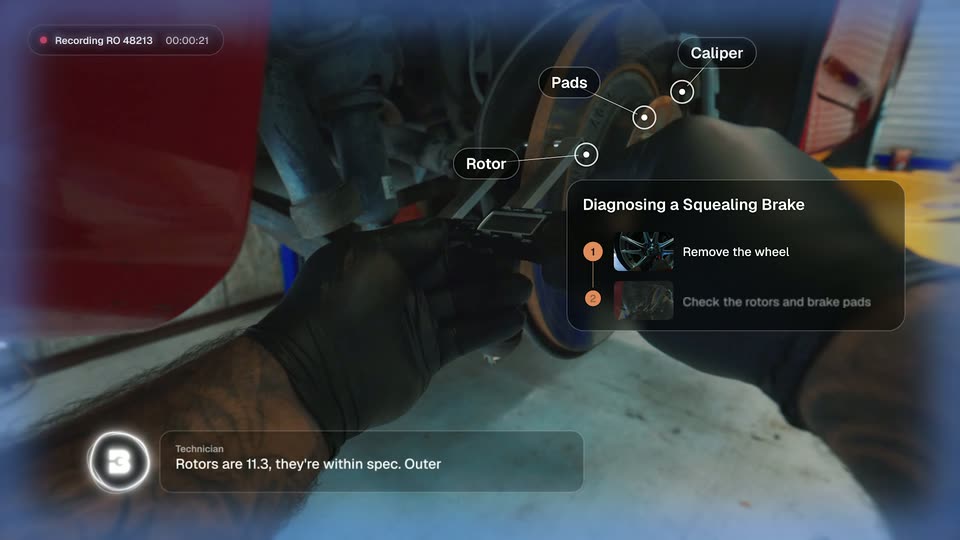
First-person view of gloved hands holding a caliper against a car brake rotor. Annotation tags for Rotor, Pads, and Caliper pop in with leader lines. A right panel builds a two-step list, and a bottom caption types the technician's reading.
Camera: Push in
Under-car POV shot of a brake rotor and caliper; a gloved hand works on the assembly. A dark card on the right lists two numbered diagnostic steps with small thumbnails, and a caption bar at the bottom types out the technician's readings.
Camera: Static
First-person view of a gloved hand using a tool on a car brake caliper. An AR overlay lists repair steps on the right, step three fading in, while a technician caption types out at the bottom left.
Camera: Push in
First-person view of gloved hands inspecting a brake rotor and caliper. An AR step panel on the right highlights step 2, then adds step 4; a dot marker and an Issue found callout point at the caliper; a lower-left caption card updates the technician's line.
Camera: Static
First-person view of gloved hands, one forearm tattooed, inspecting a car's brake rotor and caliper. The hands withdraw as augmented-reality panels fade in: a green scan line, a diagnosis-complete badge, and a repair-recommendation box, with a technician caption at the lower left.
On-screen text: “Dang, there it is. Slide pins are seized.”
Camera: Static
Live-action footage of a gloved hand spraying a car brake rotor fills the frame, then shrinks into a card on the left of a dark interface with two empty panels beside it. A transcript line types out 'Cleaning the' under a speaker icon.
Techniques: UI zoom
Camera: Pull out
A dark interface frames three side-by-side video clips of brake repair, labeled steps 5 to 7. The center clip of gloved hands opening a parts box brightens and gets a white border as the side clips dim, while a technician caption types out below.
Techniques: Split screen
Camera: Pull out
A dark interface shows three side-by-side video panels of brake repair, each with a step label at the top. The right panel expands over the middle one while the bottom caption changes to read Bleeding it now.
Techniques: Split screen, UI zoom
Camera: Push in
A first-person recording view of a tattooed, gloved mechanic's arm working on a car's brake rotor and caliper, framed by a dark rounded vignette. A recording pill with a running timer sits top-left and a technician transcript caption with a speaker icon sits bottom-left, the caption text scaling in as it appears.
Camera: Static
A close-up of a car's brake rotor and caliper in a dim workshop, framed by a dark blurred vignette. A recording badge sits top-left and a technician caption box bottom-left. A small circular target marker with a vertical stem pops in over the caliper.
Camera: Static
Close-up of a brake rotor and caliper under a lifted car in a workshop, overlaid with app UI: a recording chip, an annotation label pinned to the caliper, a repair photo card fading in at right, and a bottom bar switching from the technician's note to “Listening...”.
Camera: Static
Locked-off close-up of a silver alloy wheel as a gloved hand works a tool at the hub. A recording HUD with a red dot and ticking timer sits top-left, while a Cause & correction panel on the right opens and fills with diagnostic notes.
On-screen text: “New caliper and brake pads installed”
Camera: Static
First-person view of a gloved hand working a red tool on a Honda wheel, framed by a blurred viewfinder mask. A translucent panel on the right fills in with cause and correction notes, a repair photo, and a claim-submitted button while the top-left timer ticks.
Camera: Static
A mechanic in a blue shirt and black cap works a power tool into the hub of a red car's wheel, the vehicle raised on a yellow lift in a workshop.
Camera: Static
A bearded mechanic in a blue uniform and cap works an impact wrench on the wheel of a red car raised on a lift. The frame blurs and the word Every fades in at center.
On-screen text: “Every”
Techniques: Kinetic type
Camera: Static
A close-up card of a mechanic working under a car zooms out until it sits in a wall of labeled repair clips. The headline swaps phrase by phrase over the center card, and a light streak flashes across it as the grid fills the frame.
On-screen text: “Every repair captures”, “how expert technicians fix cars”, “and makes Bay smarter”
Techniques: Kinetic type, UI zoom, Light sweep
Camera: Pull out
A dense grid of small video tiles fills the frame, each looping workshop footage of red cars, alloy wheels, engines and welding sparks. The grid drifts slowly downward, with tiny caption labels on some tiles.
Camera: Pull out
A dark full-frame grid of car-repair video thumbnails, each tagged with a small label and icon, fills the screen. A white brand logo scales in and settles at the center.
Camera: Pull out
A dark mosaic of small auto-repair video clips fills the frame as a static backdrop. The white Bayworks icon and wordmark sit centered, then the tagline fades in below in light type.
On-screen text: “Intelligence that runs vehicle repair”
Camera: Pull out
The white Bayworks logo and wordmark hold center on a black background with the gray tagline beneath. A dark pill badge carrying the URL appears below the tagline, then the frame holds still.
On-screen text: “Intelligence that runs vehicle repair”, “bayworks.app”
Camera: Static