0:21

Introducing Orior in Claude
Orior AI · AI · Oct 2026
Craft · Oct 2026 · 1:31 · AI-annotated
A product update announcement built as an alternating pattern of a talking-head presenter and fast screen demos, with each feature announced in one voiceover line and then shown in tight, smoothly zoomed UI close-ups. The pace is brisk at about 18 cuts per minute, and floating 3D device renders over soft gradient backdrops give the product shots a clean, minimal look.
Orior AI · AI · Oct 2026
Zapier · Productivity · May 2023
Craft · Productivity · Nov 2020
A bearded man in a tan cap and plaid shirt sits behind a laptop, speaking to camera in a home office. A shelf with a framed certificate and a crossword board sit behind him; he smiles and gestures lightly while talking. Static medium shot.
Camera: Static
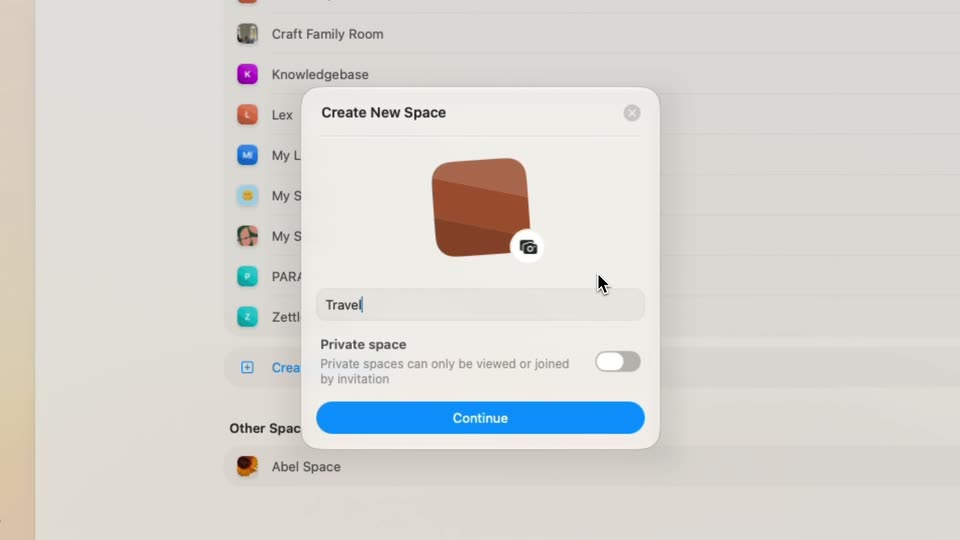
A zoom pushes into the space list of a settings window. The cursor clicks Create New Space, a modal with a brown icon and name field pops in, the cursor types Travel into the field, then slides down to the blue Continue button.
Techniques: UI zoom, Cursor demo
Camera: Push in
A bearded man in a tan cap and plaid shirt sits behind a closed laptop, talking to the camera. The locked-off shot frames him mid-torso in a home office with shelves, plants, and a crossword board behind him. He blinks and shifts his head slightly as he speaks.
Camera: Static
Split screen of two app views: left, a chat panel with stacked prompt cards; right, a shortcuts list under a search field reading “Craf”. The list scrolls down as the cursor hovers over entries, and the frame slowly pans to reveal both panels.
Techniques: Split screen, Cursor demo
Camera: Pan
The frame pulls back from a close-up to reveal the full Craft automation window on a blue gradient. The cursor clicks the Add to field of the last block, opening a dropdown of note names, then the view zooms in on the list.
Techniques: UI zoom, Cursor demo
Camera: Pull out
A close-up of a note app interface shows an action pill above a dropdown panel with a search field and a list of note titles. A cursor glides down the list as the entries scroll, highlighting rows in turn.
Techniques: Cursor demo
Camera: Static
A close-up of a note app shows a dropdown of note titles scrolling upward past a search field. A cursor hovers over the middle of the list. Above, a bar displays 'Add to Daily Note (Today) in My Life (My Family)'. The scroll is steady and continuous.
Camera: Pull out
Close-up of a Notion 'Add to' bar with an open dropdown showing a search field and a list of notebooks. A cursor moves down the list as it scrolls, revealing entries such as Project Updates and Fall Cozy Moodboard.
Techniques: Cursor demo
Camera: Pull out
A note-app panel with an Add to bar and a search dropdown of note titles sits on a light gray field. A cursor rests on one row, then the whole panel fades out and slides up-left while the cursor glides right.
Techniques: Cursor demo
Camera: Pan
A tilted app window on a light gradient background shows a stacked list of quick-action rows and a right-side command palette. The window eases from a slight 3D tilt toward a flatter front view.
Techniques: 3D mockup
Camera: Pull out
A bearded man in a tan cap and plaid shirt sits behind a laptop, speaking to camera in a home office. A shelf with a framed certificate and a tile board flank him; a plant branch hangs in the right foreground. The frame stays locked off.
Camera: Static
A bearded man in a tan cap and plaid shirt sits behind a laptop, speaking to camera in a home office. Shelves and a crossword board fill the background. Locked-off medium shot, static.
Camera: Static
On a light home screen, a small Starred widget card scales up into a larger card with a blue outline, then widens into a landscape shape. The heading and card content swap to a Folder widget showing My Life while the subtitle updates.
Techniques: Morph
Camera: Static
A widget settings screen with a left sidebar and a centered white card labeled Folder. The card enlarges to reveal a folder icon and an error message, while the top heading and subtitle remain fixed.
Techniques: Morph
Camera: Static
A product page shows a Folder widget preview, a white rounded card with a folder icon and an error line. The card widens, then the view switches to a Quick Open preview with a small gradient-bordered tile. Pagination dots advance at the bottom.
Techniques: Morph
Camera: Static
A pale interface panel shows the heading Quick Open and a gray caption above a centered rounded card with a gradient border labeled Home and My Life; the card floats on a soft shadow over a light sidebar, with dots at the bottom as the text slides in.
Camera: Static
A pale feature panel over a dimmed app window shows a single 'Home' tile with star, check and plus icons under a 'Quick Open' heading. The heading and subtitle slide out as the tile becomes a row of four labeled icon tiles under 'Quick Actions'.
Camera: Static
A light gray product screen holds a centered Quick Actions panel with a Quick Open search field and four icon buttons labeled Starred, Tasks, Daily Note and Quick Entry. A cut-off sidebar sits at the left edge and pagination dots line the bottom, the frame locked static.
Camera: Static
A document page with a Mount Fuji photo and Japanese travel notes sits beside a style panel. The view zooms in as a cursor clicks through font options, swapping the document's typeface in real time.
Techniques: UI zoom, Cursor demo
Camera: Push in
A foldable phone mockup rests at a slight angle on a plain white background, its open screen showing a documents app with a left sidebar and a grid of colorful document cards. The device holds still for the full shot.
Techniques: 3D mockup
Camera: Static
A foldable iPhone in 3D perspective sits open on white, its screen split into two panels. The left sidebar crossfades from a document list to a Cooking folder with media thumbnails; the right panel settles into a recipe page with a cooking photo and cards.
Techniques: 3D mockup
Camera: Static
An opened foldable phone floats in 3D over a light background. Its left screen switches from a media grid of cooking photos to a checklist of kitchen categories, while the right screen holds a static note card with a chopping photo.
Techniques: 3D mockup
Camera: Static
A foldable phone stands in 3D perspective on a white background, its split screen showing a note app. The left panel holds a table of contents while the right panel scrolls up through a cooking document with photos.
Techniques: 3D mockup
Camera: Static
A 3D foldable phone shows the Craft Cooking page, then cuts to a bearded man in a cap and plaid shirt at a desk, talking to camera and smiling as he wraps up the release.
Techniques: 3D mockup
Camera: Static
A bearded man in a tan cap and brown plaid shirt sits behind a laptop, speaking to the camera. The locked-off frame holds on him in a room with a shelf and a letter-tile board behind him. He smiles near the end.
Camera: Static