1:08

Best Motion Graphics Explainer Video for AI Platform | 1Deploy
1Deploy · Sep 2026
Trellis · Oct 2026 · 1:03 · AI-annotated
studio 1600.agency
The video flips from a dark-teal problem act driven by oversized blur-to-focus type and drifting notification cards to a pale-gray product act built on 3D-tilted UI panels that rise and rotate. Its signature moves are the rack-focus headlines, the elliptical icon ring, the dashed connector lines, and the hard teal-to-gray color reset at the logo reveal.
1Deploy · Sep 2026
Luma AI · Jun 2024
On a green grid background, the word 'Okay' in large white type holds the center while colorful app icons with red notification badges drift around it. The composition opens blurred and racks into sharp focus.
On-screen text: “Okay”
Camera: Pull out
A row of app icons with red badges sits under the caption “be honest” on a dark green grid. The caption becomes “How many problems do you” as the icons blur and tumble off the bottom edge, and a chat bubble slides in at the top left.
On-screen text: “be honest”, “How many problems do you”
Techniques: Kinetic type
Camera: Static
On a teal grid background, white notification cards drift around the edges while centered white text poses a question line by line, then a large 30 flashes in with radial motion streaks before the cards blur and rush outward.
On-screen text: “How many problems do you handle every week”, “as a property manager ?”, “30”
Techniques: Kinetic type, Particles, Speed ramp
Camera: Pull out
Blurred notification cards tumble down through a teal grid and drop into a dark 3D inbox folder with a red badge showing 80, while a white headline scales in at left.
On-screen text: “And how many actually get...”
Techniques: 3D mockup, Kinetic type
Camera: Pull out
On a teal grid, a light sans headline 'And how many actually get...' sits above a dark folder icon with a red '99' badge. The line becomes 'resolved?' as a popup menu rises over the folder, then a giant 'Yeah' scales in to fill the frame before fading.
On-screen text: “And how many actually get...”, “resolved?”, “Yeah”
Techniques: Kinetic type
Camera: Pull out
The word “Yeah” in large white sans-serif type fills a dark green background with a faint grid. The word slides horizontally across the frame, motion-blurred as it moves.
On-screen text: “Yeah”
Techniques: Kinetic type
Camera: Pull out
A white headline builds word by word over a teal grid as two chat cards, a guest message and a reply, pop in and connect via a dashed line. The view then pans right to show app notification cards.
On-screen text: “Not because you didn't reply”, “problems you”
Techniques: Kinetic type
Camera: Pan
A white chat card holds left as four green notification cards tilt in 3D perspective on the right, joined by dashed lines, while a white headline sharpens from a horizontal blur above.
On-screen text: “But the problems you're replying to just don't move.”
Techniques: 3D mockup
Camera: Pan
On a dark teal grid, a white chat card sits at left while four tilted task cards float in 3D perspective at center, drifting slowly. The white headline completes across the top as the clip runs.
On-screen text: “problems you're replying to just... don't move”
Techniques: 3D mockup, Kinetic type
Camera: Pull out
A teal grid backdrop shows the centered white word 'Well...' scaling in, then 'You're not' scales in up-left as a dotted sphere of small squares rises from the bottom, carrying a coin, a photo card and a red dot.
On-screen text: “Well...”, “You're not in control anymore”
Techniques: Kinetic type
Camera: Static
A dotted teal globe spins in 3D with small house photos pinned by red dots on a gridded background. White headlines fade and scale in one after another, then the globe fades and the photos blur away as the last line holds centered.
On-screen text: “You're not in control anymore”, “Things are slipping”, “you don't even see it”
Techniques: Kinetic type
Camera: Pull out
The word Stop is centered in large white type on a teal background with a faint grid, locked off and filling the frame for the full shot.
On-screen text: “Stop”
Camera: Pull out
On a pale gray grid, the green Trellis wordmark settles at center as the tagline fades in above it, while a tilted interface panel with a menu list slides up from the bottom edge.
On-screen text: “the agent that gets sh*t”
Techniques: Kinetic type, 3D mockup
Camera: Static
A tilted 3D card of the Trellis dashboard rises from below the centered headline, passing behind the text as it scales up to fill the frame on a light gray grid background.
On-screen text: “the agent that gets sh*t done”
Techniques: 3D mockup
Camera: Pan
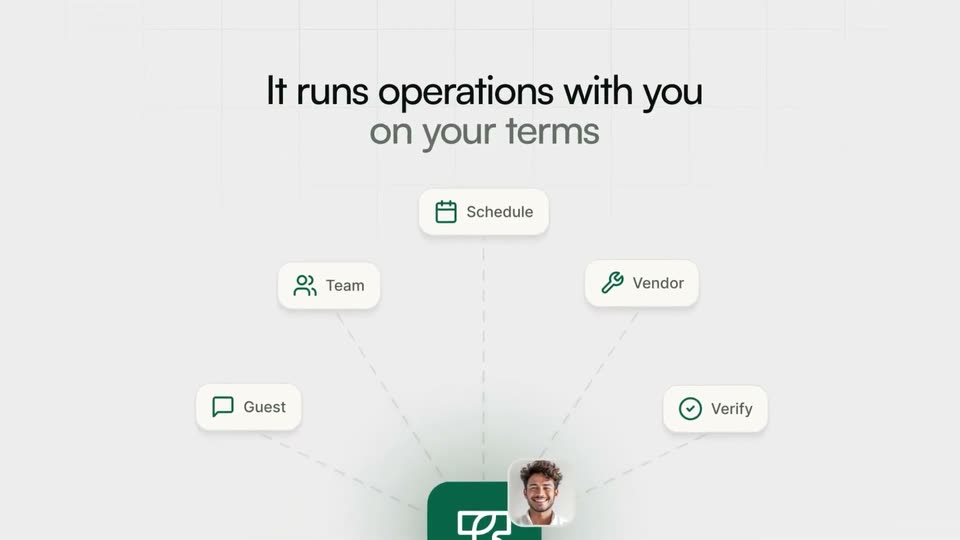
Five white pill cards (Schedule, Team, Vendor, Guest, Verify) connect by dashed lines to a green app icon below. The two-line headline fades in above, a circular photo of a smiling man pops in beside the icon, then the text clears as italic 'Plugged' appears.
On-screen text: “It runs operations with you”, “on your terms”, “Plugged”
Techniques: Kinetic type
Camera: Push in
On a light gray grid background, the two-line headline “Plugged into everything you already use” fades and scales in at center while a row of colorful app icons scrolls leftward along the bottom edge.
On-screen text: “Plugged into everything you already use”
Techniques: Kinetic type
Camera: Pan
A ring of colorful third-party app icons rotates in 3D around a centered headline, starting blurred then snapping into focus. The icons loop along an elliptical path with depth, while the dark gray text holds in the center as the line 'already use' scales in.
On-screen text: “Plugged into everything you”, “all in one unified platform”, “already use”
Techniques: Parallax
Camera: Pull out
A curved row of colorful app icons arcs across a light gray grid, captioned “all in one unified platform”. The icons clear and “Your guest has” scales in at center as a large blurred teal word slides up from the bottom edge.
On-screen text: “all in one unified platform”, “Your guest has”, “an”
Techniques: Kinetic type
Camera: Pan
Large green lowercase text “an issue” sits on a light grid background, with small black text “Your guest has” above the dot of the i. The type blurs as a white card carrying a small logo slides up from the bottom.
On-screen text: “Your guest has”, “an issue”
Techniques: Kinetic type
Camera: Pull out
Two-column layout on a faint grid. Left, a green serif headline “an issue” above a numbered list that builds line by line. Right, a white card panel where agent-action cards (message analysis, vendor contact, call, calendar) slide in down a vertical timeline. Ends on the centered word “Damage”.
On-screen text: “an issue”, “The agent picks it up”, “Calls the handyman”, “Schedules it”, “Updates the guest”, “Damage”
Techniques: Kinetic type, Split screen
Camera: Push in
A light gray grid background holds the line Damage after, which shrinks and rises as the word checkout scales up beneath it in large dark green lowercase letters.
On-screen text: “Damage after”, “checkout”
Techniques: Kinetic type
Camera: Pull out
A large green checkout headline sits left of a vertical column of workflow cards that scroll upward. Four numbered step lines fade in beneath the headline as the cards reveal agent names, small thumbnails and green connector lines linking each task.
On-screen text: “checkout”, “Receives photos from inspection”, “Opens the browser”, “Files the claim on Airbnb”, “Orders replacement on Amazon”
Techniques: Split screen, Kinetic type
Camera: Push in
A large teal word, checkout, slides over a numbered step list on the left as a task UI panel floats on the right. Both cross-fade to the word message above a conversations screen, all on a flat light grid.
On-screen text: “checkout”, “Receives photos from inspection”, “Files the claim on Airbnb”, “Orders replacement on Amazon”, “message”
Techniques: Kinetic type
Camera: Pan
A large dark-green word messages fills the background over a faint grid. A white conversation list with contact rows slides up from the bottom, partially covering the word as the layers drift at different speeds.
On-screen text: “messages”
Techniques: Parallax
Camera: Pan
A light grid background holds a large green lowercase word, tasks. A 3D-tilted task board interface, with a left sidebar and a list of task rows, slides down across the frame, clearing the word into full view.
On-screen text: “tasks”
Techniques: 3D mockup
Camera: Static
A tilted 3D mockup of the app rotates between a task list and a team view while an oversized green word behind it swaps from tasks to people on a pale grid background.
On-screen text: “tasks”, “people”
Techniques: 3D mockup, Kinetic type
Camera: Pan
A tilted 3D card of the Team screen floats in front of a huge green lowercase word “people” on a pale grid backdrop. The card drifts up slightly as the word holds still.
On-screen text: “people”
Techniques: 3D mockup
Camera: Static
A large green 'people' headline hovers over the app interface. The camera pulls back through 3D space to reveal a desktop, tablet and phone arranged around the gray word 'Connected' on a light grid.
On-screen text: “people”, “Connected”
Techniques: 3D mockup
Camera: Pull out
Four device mockups (monitor, phone, tablet, laptop) float in 3D perspective around a thin circle on a light grid background, each showing the same task interface. Centered, the dark word “Connected” holds still while “around you” scales in below it.
On-screen text: “Connected”, “around you”
Techniques: 3D mockup, Kinetic type
Camera: Push in
On a pale gray grid, centered phrases crossfade in sequence: 'Connected around you' soft and out of focus, then 'Same business', 'Just...', 'finally running' in sharp black type. A small white pill with a green check and '3 hrs saved' slides in from the left.
On-screen text: “Connected”, “around you”, “Same business”, “Just...”, “finally running”
Techniques: Kinetic type
Camera: Push in
A light gray grid backdrop holds three white checkmark pills floating at left, top and bottom right while the centered line finally running sharpens from a soft blur to full focus. The pills drift slowly across the frame.
On-screen text: “finally running”, “Direct bookings up 34%”, “3 hrs saved today”, “100% response rate”
Camera: Pan
On a light gray grid backdrop, the green Trellis logo settles into the center above a dark green pill button. A pale green cursor slides in from the lower right, hovers the button and presses it.
On-screen text: “Try Trellis today →”
Techniques: Kinetic type, Cursor demo
Camera: Static