1:09

Cal.com introducing Dynamic Group Links
Cal.com · Productivity · Aug 2022
Routant · Oct 2026 · 1:11 · AI-annotated · YC Fall 2026
The video alternates a single live-action presenter on a pier with flat, light UI screens and a conceptual logo animation, cutting on the voiceover's sentence boundaries. Signature moves include the white diagonal wipe, the circular mask logo reveal, and the persistent two-tone headline anchoring the feature demos.
Cal.com · Productivity · Aug 2022
Apple · Hardware · Oct 2026
Runway · AI · Oct 2026
A man in an olive jacket stands centered on a wooden pier against a bay and bridge backdrop, speaking to camera with small hand gestures. White subtitles track his speech at the bottom, key phrases in red, and the Routant logo and wordmark appear above him at the end.
On-screen text: “Agents are no longer”, “just chatting with us.”, “They're acting for us.”, “We're starting to delegate work”, “that requires access”, “to our most sensitive systems”, “and our private data.”, “That makes security”, “more important than ever before.”, “An agent's capabilities determine what it could do. Its access determines what it can. And as that agent's capability grows, we need a secure way to connect our”
Camera: Static
A white diagonal wipe finishes revealing the Routant dashboard, a light interface with left sidebar, four stat cards and gateway health rows. The shot holds, then cuts to the MCP Servers page where a cursor rests mid-screen.
On-screen text: “we're launching Routant.”, “Routant”
Techniques: Masking, Cursor demo
Camera: Static
The Routant dashboard holds on the MCP Servers page. A left sidebar highlights the MCP Servers item; the main panel shows a grid of third-party integration cards (Atlassian, GitLab, Gmail, Google Drive, Slack, Linear) and two private server cards. The frame stays static throughout.
Camera: Static
A flat dashboard view of the Policies screen: a left navigation rail, a middle list of agent policies, and a right panel holding a three-row rules table (Allow, Hide, Ask approval). The screen holds still for the full shot.
Camera: Static
Full-screen view of the Agents dashboard, held static: a left navigation rail, a connection URL field with a copy button, and two agent cards side by side, each showing a connected status and tool access.
Camera: Static
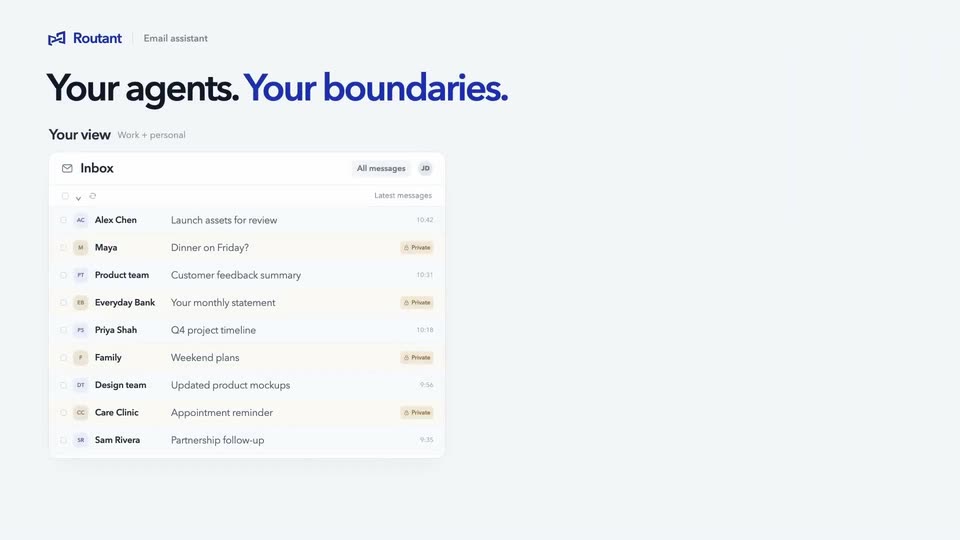
A light field assembles into an email-assistant mockup: the Rootant logo and 'Email assistant' tag sit top left, a bold two-tone headline reads 'Your agents. Your boundaries.', and a white inbox card lists senders, personal rows tagged 'Private'.
On-screen text: “Email assistant”, “Your agents. Your boundaries.”
Camera: Static
Split-screen: two inbox cards under the headline 'Your agents. Your boundaries.' The left lists all mail, private rows highlighted; the right fades in, grays private rows as 'Excluded,' then settles on work-only rows. Footnotes fade in beneath each card, then the frame crossfades to a support-agent card.
On-screen text: “Your agents. Your boundaries.”, “Your view”, “Work + personal”, “Agent view”, “Only what you allow”, “Personal & sensitive email stays with you”, “A full inbox. Work email only.”
Techniques: Split screen
Camera: Pull out
A product interface for a support agent plays out a five-step workflow. A left panel logs each diagnostic step while a dark terminal on the right types findings, the top stepper advances from Connect to Report, and a headline reads “Your agents. Your boundaries.”
On-screen text: “Your agents. Your boundaries.”, “Find and report freely. Restricted changes require your approval.”
Camera: Static
Under a static headline, a flat product screen shows a support agent workflow: a left checklist beside a three-page report. The report completes, an approval modal appears, a cursor clicks Approve fix, and the modal turns green and verified as the step bar advances to Fixed.
On-screen text: “Your agents. Your boundaries.”, “Find and report freely. Restricted changes require your approval.”, “Approved. Applied. Verified.”
Techniques: Cursor demo
Camera: Static
A product dashboard with a navy-and-blue headline and two report panels holds, then a circular mask opens at center to reveal the blue Routant logo as the interface fades to a plain lavender field, leaving the logo centered.
On-screen text: “Your agents. Your boundaries.”, “Approved. Applied. Verified.”
Techniques: Masking
Camera: Static
Three colored role icons on the left send labeled lines converging into a central circular logo hub. The hub morphs into a vertical blue pill with a checkmark line extending right, then a diagonal wipe reveals a live-action dock.
On-screen text: “Personal”, “Support”, “Team”, “Work email only”, “Approve changes”, “Allowed tools only”, “Approval”
Techniques: Morph, Masking
Camera: Static
A man in an olive jacket stands behind a wooden railing by a bay, speaking to the camera and gesturing, with white subtitles at the bottom; near the end two white bracket shapes fade in beside his head.
On-screen text: “We want people and businesses”, “to have the full benefit of Al”, “working on the things that”, “actually matter.”, “Routant brings the”, “access and controls”
Camera: Static
A man in a tan jacket stands at a wooden harbor railing, speaking to camera against a wide blue sky and sea. A white geometric logo hovers over his face. A white panel wipes in from the right at the end.
On-screen text: “to make that possible.”
Techniques: Masking
Camera: Static
A light gray frame holds a blue geometric logo mark at center. The bold blue wordmark Routant appears to its right, then the full lockup holds still on a locked-off frame.
On-screen text: “Routant”
Camera: Static