1:14

SaaS Explainer Video for Recruitment Platforms 2026 | JobWriter
JobWriter · May 2026
The video alternates full-frame kinetic type cards with locked-off dark UI mockups, cut hard to a fast beat to contrast the easy demo with the painful production stack. Signature moves: words that blur and scale into place, red error rows flipping to green checks in one pass, and a purple brand glow that returns on every logo beat.
JobWriter · May 2026
Raycast · Productivity · Feb 2025
Cursor · Developer tools · Feb 2026
On a black grid background, the phrase Getting your agent sits in a purple-blue gradient, scaling gently in place. Two white outline cursors drift inward from either side and meet beneath the word agent.
On-screen text: “Getting your agent”
Techniques: Kinetic type
Camera: Static
On a black field with a faint grid on the right, the white caption Getting your agent sits centered, sharpening from a soft glow. A purple cursor arrow drifts on the right, shifting from a glowing fill to a thin outline.
On-screen text: “Getting your agent”
Techniques: Kinetic type
Camera: Static
Black frame with a white headline at the top and a dim assistant greeting plus a row of five colored app icons below. A horizontal light beam sweeps across at the start, then the headline and greeting brighten and fade to gray.
On-screen text: “Getting your agent”, “To work in a demo?”
Techniques: Light sweep, Kinetic type
Camera: Static
A dark chat interface fills the frame, a greeting and a row of app icons centered above an input field. A purple cursor hovers as the prompt types into the field, while the heading and labels slide upward off the top.
On-screen text: “To work in a demo?”
Techniques: Cursor demo
Camera: Pull out
On a black field with a soft purple glow in the lower right, the white word EASY slides into the center and holds still.
On-screen text: “EASY”
Techniques: Kinetic type
Camera: Static
A dim, blurred frame sharpens into a locked-off dark dashboard: four red error cards (401, 429, 502, 409) stacked under the white headline “Getting it to work in production.” A large word, “EASY,” slides in over the list.
On-screen text: “Getting it to work in production”, “EASY”
Techniques: Kinetic type
Camera: Static
A dark error dashboard, framed by thin red corner brackets, lists four failed tool calls with red X marks. The panel recedes and dims toward the center while a large white line, across every customer's stack, fades in sharp in the foreground beneath the headline Getting it to work in production.
On-screen text: “Getting it to work in production”, “across every customer's stack”
Camera: Pull out
On a near-black maroon field, the white line 'across every customer's stack' compresses horizontally and clears. A glowing red-orange line 'completely different problem.' flares in, then 'Most teams only find out' fades up in dim red.
On-screen text: “across every customer's stack”, “completely different problem.”, “Most teams only find out”
Techniques: Kinetic type
Camera: Static
On a black field with a faint grid in the top right, a white sentence assembles word by word, left of center. The line scales down slightly as it grows, ending with the final phrase 'completely different problem.'
On-screen text: “Most teams only find out how hard it is after they've”, “completely different problem.”
Techniques: Kinetic type
Camera: Static
A white sentence scales down to center on a black background with a faint grid, then the word committed scales up in purple as a giant purple letterform sweeps across the frame, and the word fades out.
On-screen text: “Most teams only find out how hard it is after they've”, “committed”
Techniques: Kinetic type
Camera: Pull out
A dark purple gradient background holds a blurred silver 3D layered icon at center. It sharpens into a stack of three slabs as the word Paragon glows in beside it, then the wordmark fades out, leaving the icon alone.
On-screen text: “Paragon”
Techniques: Kinetic type
Camera: Static
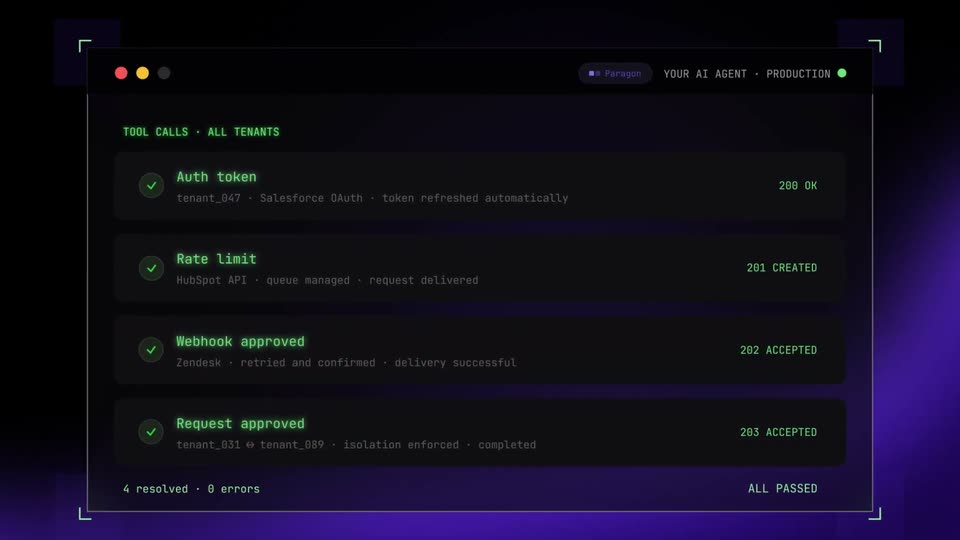
A gray monospace headline assembles word by word above a dark terminal window listing four red error rows. Each row flips to a green checkmark and success code in turn, the footer counting to 4 resolved, as the camera pushes in on the list.
On-screen text: “Making Integrations Simple”
Techniques: Kinetic type, UI zoom
Camera: Push in
A black screen holds a single centered line of white text that fades in from faint to full brightness, then stays locked off and static for the rest of the clip.
On-screen text: “Integration infrastructure for AI agents.”
Camera: Static
A silver layered-cube logo and the wordmark Paragon scale in on a dark purple background with a light glint, then shrink to the icon alone. The icon fades and a thin-bordered LEARN MORE button with a purple arrow holds center.
On-screen text: “Paragon”, “Integration infrastructure for Al agents.”, “LEARN MORE”
Techniques: Light sweep
Camera: Static