1:25
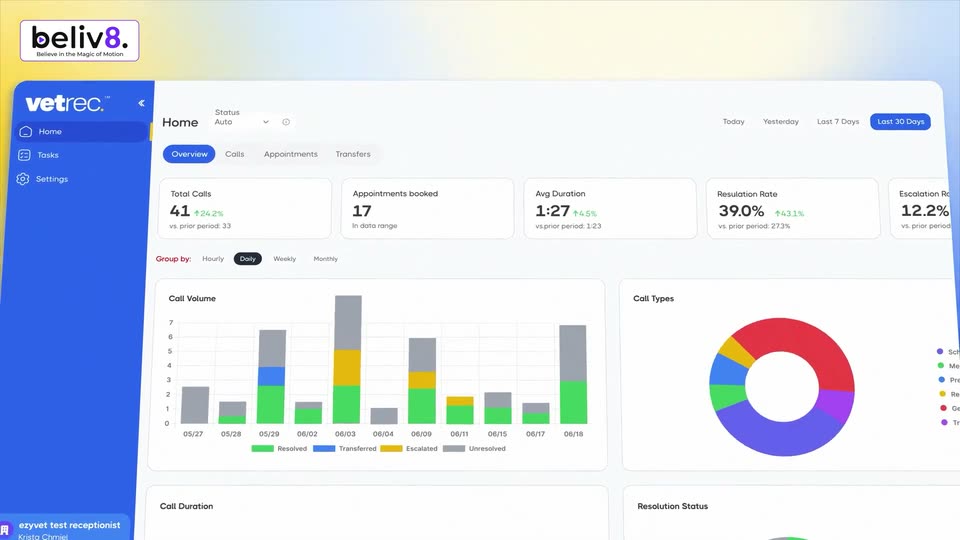

Product Feature Video for VetRec - Veterinary AI Assistant
VetRec · Sep 2026
Lovable · Apr 2025 · 1:20 · AI-annotated
The video is built from rapid text-card beats on grainy pink, blue and orange gradients, alternating with 3D-tilted browser mockups that snap into flat focus to demo each feature. Signature moves are blur-to-sharp type reveals, a cartoon hand cursor driving the UI, and glowing gradient wipes that separate the feature blocks.
VetRec · Sep 2026
ClickUp · Productivity · Jun 2023
Pitch · Productivity · Apr 2022
A grid of pink and orange gradient circles on a cream field scales up, zooming toward the center where the white word Today stays fixed in place.
On-screen text: “Today”
Camera: Pull out
A field of soft pink dots fades on cream, then bold black text “Less than 1% of the world” scales in around a small pink logo dot. The phrase swaps to “knows how to code”, framed by large pink-to-blue gradient curly braces.
On-screen text: “Less than 1% of the world”, “knows how to code”
Techniques: Kinetic type
Camera: Pull out
Two large gradient curly braces, pink fading to blue, frame the edges of a cream background. Centered black text reads 'knows how to code' and scales up gently in place.
On-screen text: “knows how to code”
Techniques: Kinetic type
Camera: Pull out
As the line “knows how to code” scales out, a centered black sentence assembles word by word on a cream ground with soft pink blurs in the corners, growing from “but that’s about” to the full line “but that’s about to change”.
On-screen text: “knows how to code”, “but that's about to change”
Techniques: Kinetic type
Camera: Static
A lowercase caption scales away as the word Meet, filled with a blue-to-orange gradient, snaps from blur into focus and grows at center on a cream background with soft pink and purple corner glows.
On-screen text: “but that's about to change”, “Meet”
Techniques: Kinetic type
Camera: Static
The word Meet scales in on a blue field, then a cream heart and the Lovable wordmark reveal from left to right as the background blooms into a pink-orange gradient.
On-screen text: “Meet”, “Lovable”
Techniques: Kinetic type, Masking
Camera: Static
A cream heart icon and the wordmark Lovable sit centered on a grainy gradient that runs from blue to pink to orange. The logo reveals itself in place and holds on a locked-off frame.
Techniques: Kinetic type
Camera: Static
A grainy dark background holds large blue and pink spheres near the frame edges. Centered white text reads “Start building,” then scales down and swaps to “apps” as the spheres drift inward.
On-screen text: “Start building”, “apps”
Techniques: Kinetic type
Camera: Static
A white word sits centered on a dark field while a blue sphere drifts at the top right and a pink sphere rises at the bottom left, the two shapes sliding at different speeds to give depth.
On-screen text: “ideas”
Techniques: Parallax
Camera: Static
The word Faster in bold white sans-serif grows from the center of a pink, blue and orange gradient. Two bright diagonal beams cross the frame at the start and dissolve as the type expands to fill the width.
On-screen text: “Faster”
Techniques: Kinetic type
Camera: Static
A grainy pink-to-orange gradient fills the frame as the white centered phrase “than ever before” assembles from the word “than” and then holds.
On-screen text: “than ever before”
Techniques: Kinetic type
Camera: Static
On a soft pink and cream gradient, the word Join slides in large at center, then shrinks as other builders joins it. The line clears and creating builds up letter by letter, centered on the locked-off frame.
On-screen text: “Join”, “Join other builders”, “creating”
Techniques: Kinetic type
Camera: Static
A large bold counter rolls upward from 23,948 to 56,989 on a soft cream field with blurred pink and blue blobs. A glossy wavy line in pink and orange draws across the lower frame, its white tip tracking the count.
On-screen text: “23,948”, “29,962”, “50,973”, “56,989”
Techniques: Kinetic type
Camera: Static
On a cream background with soft pink and purple gradient blobs, dark gray words appear centered, each larger than the last: 'new apps', then 'every', then 'day'. The scene ends on an extreme close-up of a dark rounded shape holding a white oval with a pink four-pointed star.
On-screen text: “new apps”, “every”, “day”
Techniques: Kinetic type
Camera: Static
A white scalloped flower with a small pink four-point sparkle at its center sits on a pink-to-orange gradient. The sparkle swells into a large dark purple star that fills the frame as the background fades to pale pink.
Techniques: Morph
Camera: Push in
A dark purple website hero fills the frame. The white headline 'Unleash Intelligent' sits above 'Innovation,' which fades in in lavender. A glowing arc spans the bottom over a row of logos. The view then reframes, the hero becoming a rounded card above a collage of other screens.
Techniques: Kinetic type
Camera: Pull out
A grid of mockups scrolls at different speeds: the left “Designing Interiors” card slides down while the dark landing page, health dashboard and property site in the center and right drift upward.
Techniques: Parallax
Camera: Push in
A stack of tilted website and app cards rotates in 3D; the central drone-rental site card swings to face the camera, its large red Skyscopter headline and a black quadcopter in front, while side panels slide past at the edges.
Techniques: 3D mockup
Camera: Pan
A laptop mockup rests on dark rocks, its screen showing a drone rental website with a large red wordmark. The camera pulls back and orbits the device, then a pink and orange wipe sweeps across to reveal white text.
On-screen text: “Ask Lovable to create”
Techniques: 3D mockup, Masking
Camera: Pull out
A black prompt bar glows orange on a black background as the prompt types itself in. A hand cursor clicks the send button, and the bar morphs into a tilted 3D browser window of the generated site while the glow turns blue.
Techniques: Kinetic type, Cursor demo, Morph, 3D mockup
Camera: Static
A dark prompt panel and the generated Clario storefront sit in 3D perspective over a pink-blue glow. The view zooms into the input, types a sidebar request, clicks send, then pulls back as a profile and balance sidebar appears on the right.
Techniques: 3D mockup, UI zoom, Cursor demo
Camera: Push in
On a grainy cream-to-pink gradient, the word Now scales in at center and the line extends to Now with collaboration while two multiplayer cursors, pink Lucy and orange Jonathan, slide in and settle below the text.
On-screen text: “Now with collaboration”, “Lucy”, “Jonathan”
Techniques: Kinetic type
Camera: Static
Close-up of a white interface card on a warm cream gradient. A cartoon hand cursor glides up from the lower area and settles on the gray Invite button beside the blue Publish button.
On-screen text: “Now”, “Lucy”, “Jonathan”
Techniques: Cursor demo
Camera: Static
A white invite card with an email field and three member rows slides in over a warm orange gradient, a cartoon hand cursor rests on the Invite button.
On-screen text: “Publish”
Techniques: Cursor demo
Camera: Static
A row of five circular portrait photos on a soft pink-to-cream gradient. The fourth and fifth avatars reveal in sequence, each opening through a soft pink circular glow that fades.
Techniques: Masking
Camera: Static
A close-up of a top bar holding five avatar circles and a large “Invite” callout pulls back to reveal a full analytics dashboard. Named collaborator tags for Noah, Jonathan, Lucy and Jodie sit over the charts beside a chat panel.
On-screen text: “Invite”, “Edit in preview”
Techniques: Kinetic type, UI zoom
Camera: Pull out
A cream field with a soft pink radial glow. The bold dark gray word “Edit” sits centered, then “in preview” extends the line to read “Edit in preview”.
On-screen text: “Edit in preview”
Techniques: Kinetic type
Camera: Static
An extreme close-up of the pink-ringed wheel mark pulls back quickly to reveal the full white-and-pink logo centered on a blue rounded rectangle, with a soft blurred pink shape resting in the lower-left corner.
Camera: Pull out
A tight crop on the dark Ask Lovable input field pulls back to reveal the full toolbar with Attach, Edit and Mode controls. A white hand cursor drops in from above and taps the blue Edit button.
Techniques: UI zoom, Cursor demo
Camera: Pull out
A 3D browser mockup of a TEAMFLOW site, headlined Seamless Data. Seamless Success. with a Kanban board, rotates from an angled view to a flat front view. A left chat panel and a right task card slide out as the window straightens, a hand cursor hovering on the page.
Techniques: 3D mockup, Cursor demo
Camera: Push in
The editor UI sharpens from a blur as a hand cursor types in a dark Edit Text panel, picks XL from the text-size dropdown, then a color picker opens and a blue swatch recolors the second heading line as the view zooms out to the full page.
Techniques: Cursor demo, UI zoom
Camera: Static
A tilted 3D screen floats over a pink-to-orange gradient. The left half shows a dark chat panel; the right half shows a browser window with the TeamFlow landing page, its headline words settling into place.
Techniques: 3D mockup
Camera: Pull out
A grainy vertical gradient runs from blue at the top through pink to orange at the bottom. The white headline “Instantly share” is centered and reveals from a left-to-right mask as the clip plays.
On-screen text: “Instantly share”
Techniques: Masking
Camera: Static
A grainy pink-to-orange gradient holds a sequence of large white lowercase words that swap in place, ending on a smaller line. The scene then cuts to a tight close-up of two interface buttons, Invite and Publish.
On-screen text: “what”, “built”, “with your own domains”
Techniques: Kinetic type
Camera: Static
Close-up of a white UI panel holding a gray Invite button and a blue Publish button on a cream and coral gradient. A cartoon hand cursor glides from the lower right corner to the right edge of the Publish button.
On-screen text: “with your own domains”
Techniques: Cursor demo
Camera: Static
A white Publish dialog sits centered on a pink-to-orange gradient, soft and out of focus at first. It snaps into focus as the domain line cycles through newyorkrunclub.co, jameshickman.co and cloudflowtech.com while a hand cursor rests on the blue Publish button, then the whole card tilts into a 3D angle.
Techniques: Cursor demo, 3D mockup
Camera: Static
A browser window mockup tilts in 3D over a pink-to-orange gradient, rotating from a side angle to a flat front view. As it straightens, the Venturo landing page resolves: a large headline, three avatars, a portrait of a woman, and a green earnings card sliding up.
Techniques: 3D mockup
Camera: Pull out
A silver laptop on a light wooden desk displays the Venturo website with a woman's portrait and earnings badge in a 3D-rendered studio. A black speaker with a hand sculpture and a vase of stems flank it. The camera holds a three-quarter view as plant shadows rest on the wall.
Techniques: 3D mockup
Camera: Pull out
A black frame with a faint purple glow along the bottom holds the word Introducing in white at center, sharpening from a soft blur into crisp focus.
On-screen text: “Introducing”
Camera: Static
The wordmark “/dev mode” holds centered on a dark, grainy gradient background. Its lowercase letters are filled with a blue-to-orange gradient and a soft glow, and the locked-off frame keeps the text completely still.
On-screen text: “/dev mode”
Camera: Static
On a black field with red and purple corner glows, a white hand cursor icon slides up and taps a dark rounded code icon holding angle brackets. The glyph inside the brackets shifts from an X to a blinking text cursor.
On-screen text: “/dev mode”
Camera: Static
A black rounded-square icon holding a white code-bracket symbol glows with a blue-to-pink gradient on a dark vignetted background. A white hand cursor hovers at its lower edge and taps it, the icon pulsing in scale.
Camera: Static
A close-up of a tilted laptop screen shows the app top bar and user profile, then the camera pulls back to reveal the full dashboard with Workforce, Hires and Recruitment Fees cards and a payroll table, on a pink-to-blue gradient backdrop.
Techniques: 3D mockup, UI zoom
Camera: Pull out
A laptop tilted in 3D perspective floats on a blue-to-orange gradient. Its screen shows the Cursor editor: an AI chat panel on the left with a dark-mode request, and a TypeScript file on the right. The view holds steady.
Techniques: 3D mockup
Camera: Pull out
Centered white text phrases swap in on a dark gradient that fades from black to purple at the bottom: 'Edit', then 'right on the spot', then 'or in' flanked by the GitHub logo and 'Github'.
On-screen text: “Edit”, “right on the spot”, “or in”, “Github”
Techniques: Kinetic type
Camera: Static
A grainy blue-to-pink gradient fills the frame while the oversized white word “Now” scales down and recenters as “it’s” and “your turn” appear beside it, completing the sentence.
On-screen text: “Now”, “it’s”, “your turn”
Techniques: Kinetic type
Camera: Pan
A white sans-serif headline is centered on a grainy gradient background of blue, purple, and orange. The text changes from a statement to a question.
On-screen text: “Now it's your turn”, “What are you building?”
Camera: Static
A grainy gradient field shifts from blue at the edges to pink and orange at the center, where a heart shape pulses and scales up across the shot. The white question text stays fixed in the middle throughout.
On-screen text: “What are you building?”
Camera: Pull out
An orange-to-blue gradient heart sharpens from a blur and settles left of the white wordmark Lovable, which resolves from a blur. The URL lovable.dev fades in below on a black background.
On-screen text: “lovable.dev”
Camera: Static
The Lovable heart logo and bold white wordmark hold center on a black grainy field with soft corner glows, the URL lovable.dev set across them; the logo and wordmark fade out, leaving the centered URL on black.
On-screen text: “lovable.dev”
Camera: Static