2:14
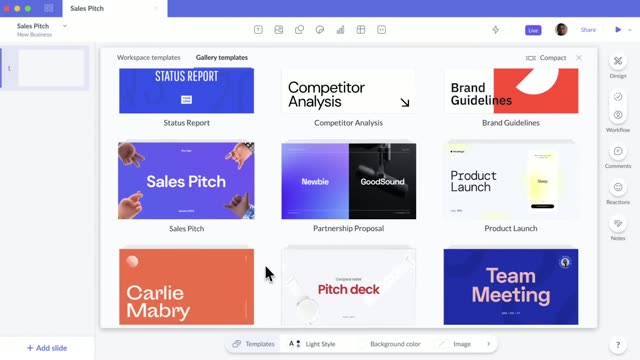

Pitch: Collaborative presentation software for teams.
Pitch · Productivity · Oct 2020
The Browser Company · Sep 2023 · 0:31 · AI-annotated
The video is built on a single flat electric blue field with white rounded type, alternating locked off text cards with UI mockups that pop, zoom, and cross fade in place. Pacing is quick at about 22 cuts per minute, and the signature moves are in place word swaps, snappy zooms into the tab sidebar, and ghost to clean text resolves that sell each feature before the name reveal.
Pitch · Productivity · Oct 2020
Notion · Productivity · Feb 2026
Ramp · Finance · Sep 2026
A solid blue browser page fills the frame above a strip of open tabs. Large white words, “Classes” then “Dorm Shopping,” pop into the lower center one after another, matching the spoken list of tasks.
On-screen text: “Classes”, “Dorm Shopping”
Techniques: Kinetic type
Camera: Static
A flat blue field holds a large white word that swaps in place from “Dorm Shopping” to “Homework.” Along the bottom, a row of browser tabs with app icons scrolls left in sync with the changing word.
On-screen text: “Dorm Shopping”, “Homework”
Techniques: Kinetic type
Camera: Static
A solid blue panel holds large centered white text that swaps words, while three horizontal rows of app icons scroll leftward beneath it like an overflowing tab bar.
On-screen text: “More Classes”, “Homework”, “Procrastination”
Techniques: Kinetic type
Camera: Static
A flat grid of colorful browser favorites icons fills the frame. A blue banner with bold white text reading Your Job Search sits at the top and shrinks upward out of view, then Your online life pops in at center with a thick blue outline.
On-screen text: “Your Job”, “Your Job Search”, “Your online life”
Techniques: Kinetic type
Camera: Static
Centered white lowercase text reads “can feel like” on a flat blue background, then swaps to “chaos”, whose letters are filled with a dense collage of app icons and browser tabs. Locked-off frame, static hold.
On-screen text: “can feel like”, “chaos”
Techniques: Kinetic type, Masking
Camera: Static
A macOS Dock on a plain blue background: the Chrome icon bounces in place, then slides right toward the trash can as its tooltip switches from Google Chrome to Remove from Dock, with a cursor resting on the icon.
Techniques: Cursor demo
Camera: Static
A flat browser window with a pink sidebar of saved folders sits on a blue field. The camera zooms into the sidebar as the cursor hovers the highlighted “Pablo Picasso” tab, shown as a white pill with a close button.
Techniques: UI zoom, Cursor demo
Camera: Push in
A pink file sidebar sits beside a Cubist-art webpage. The cursor clicks the Cubism Essay folder, its sub-items fade in, then the cursor slides down to highlight the Pablo Picasso entry.
Techniques: Cursor demo
Camera: Static
A teal browser sidebar cycles through three grouped tab sets, Korean 100, CS 101, Micro Econ 102, as the page on the right switches from a Duolingo keyboard to a GitHub repo list to an Investopedia article. A cursor hovers the active tab.
Techniques: Cursor demo
Camera: Push in
A browser mockup floats on a solid blue field. A teal tab sidebar lists course items with the Definitions tab selected and a cursor resting on it, beside a white article page whose microeconomics text is highlighted in purple.
Techniques: 3D mockup, Cursor demo
Camera: Static
Close-up of a pink tab sidebar beside a Wikipedia article page. A cursor glides down from the highlighted Robert Delaunay tab to the MoMA tab, which becomes selected and shows a close button.
Techniques: Cursor demo
Camera: Static
A pink sidebar lists research tabs with the MoMA pill highlighted under a hovering cursor. On the right, overlapping artwork captions cross-fade apart and a sepia painting of the Eiffel Tower settles into place beside its title.
Techniques: Cursor demo
Camera: Static
A pink-themed browser window shows a left tab list, a central MoMA card, and a Wikipedia biography panel on the right. A cursor hovers on the card as ghosted duplicate text on the right resolves into a single clean column.
Techniques: Cursor demo
Camera: Static
A flat browser mockup on a blue field shows the MoMA site with four Delaunay paintings. The active tab then flips to a Wikipedia page on Robert Delaunay, and the right-hand text pane shifts its content.
Camera: Static
A browser mockup on blue switches its active tab from a Khan Academy article to a YouTube feed. It then cuts to a closer framing where the feed scrolls past a thumbnail marked Keep hovering to play next to a white card of vine titles and view counts.
Techniques: Cursor demo
Camera: Static
A white list of Vine video thumbnails and view counts scrolls upward between two pink vertical bars, and dark tooltips reading “Keep hovering to play” fade in over the clips as they move.
Camera: Pan
A flat blue field holds the white phrase (or not) dead center, static for the whole beat. No other element enters or moves; the line simply sits in the middle of the frame.
On-screen text: “(or not)”
Camera: Static
A layered browser view with floating panels: a tabbed window, a cream canvas with article cards, and a settings panel. Cards and color swatches populate the panels, then the frame tightens onto the color-and-size control panel as its circles cycle through hues.
On-screen text: “(or not)”
Techniques: UI zoom
Camera: Pan
A flat blue field holds a centered white headline. The phrase scales up slightly, then swaps to a second centered phrase, both locked to the frame.
On-screen text: “Goodbye, Tab Chaos”, “Hello, Arc”
Techniques: Kinetic type
Camera: Static
On a solid blue field, centered white text reads “Hello, Arc”, then cuts to “arc.net”. The text clears and the white Arc logo rotates a few degrees into the center, easing to rest.
On-screen text: “Hello, Arc”, “arc.net”
Camera: Static